Steering Column
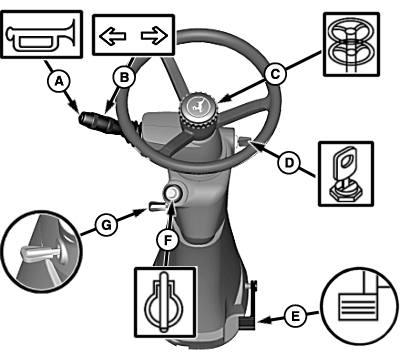
H94521-UN-02NOV10
B— Turn Signal Switch allows operator to indicate left or right-hand turns.
 CAUTION: Adjust steering wheel only when machine is stopped.
C— Steering Column Vertical Adjustment allows operator to adjust steering column up or down.
Loosen hub and push or pull wheel to position. Slightly tighten hub to hold steering wheel in position.
D— Starter Switch allows key switch to be turned to:
|
First Position .............. Accessories |
|
Second Position .............. OFF |
|
Third Position .............. Run |
|
Fourth Position .............. Start |
CAUTION: Adjust column only when machine is stopped. Do not
step on pedal without holding steering wheel.
E— Steering Column Horizontal Adjustment allows operator to move steering column with pedal to desired position.
Press pedal to release lock on steering column and move column to desired position. Column locks when pedal is released.
NOTE: Starting aid only works in ”Run” or ”Start” positions.
F— Starting Aid Push Button (If Equipped) allows operator the ability to start engine in cold conditions.
CAUTION: Adjust steering wheel only when machine is stopped.
G— Steering Wheel Tilt Adjustment (If Equipped) allows operator to move steering column with handle to desired position.
Pull up on handle to release lock and move steering wheel to desired position. Release handle to lock into desired position.
|
OUO6075,0000634-19-20110321 |