Regional Settings, Languages, Time/Date Settings, Units of Measurement
H95878-UN-29MAR10
Main Menu Icon (Display) / Main Menu Switch (Armrest)
H95849-UN-31MAR10
Display
Application Icon
Touch or press confirm switch when display settings icon is highlighted.
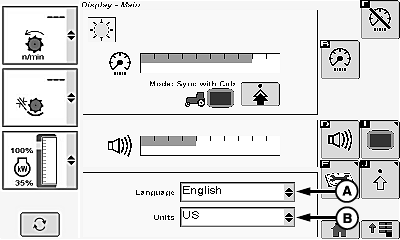
Regional/Languages/Units Menu Settings:
H95740-UN-05OCT10
A - Language Menu
B - Units Menu
Touch or press confirm switch when desired menu is highlighted:- Language Menu (A)
- Units Menu (B)
Once desired choice is made from menu, touch or press confirm switch.
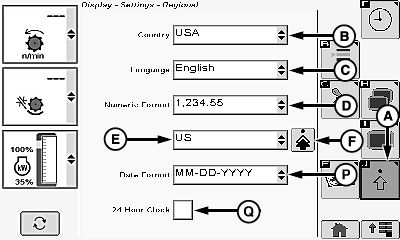
Advanced Settings:
H95741-UN-05OCT10
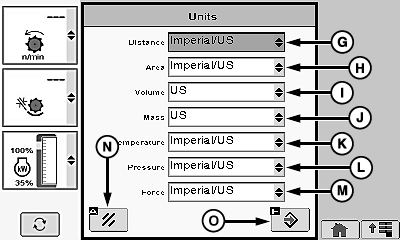
H95742-UN-05OCT10
A - Advanced Settings Icon
B - Country Menu
C - Language Menu
D - Numeric Format Menu
E - Units Menu
F - Advanced Settings Icon
G - Distance Menu
H - Area Menu
I - Volume Menu
J - Mass Menu
K - Temperature Menu
L - Pressure Menu
M - Force Menu
N - Cancel Icon
O - Enter/Accept Icon
P - Date Format Menu
Q - 24 Hour Box
Touch or press confirm switch when advanced settings icon (A) is highlighted.Touch or press confirm switch when desired menu is highlighted:
- Country Menu (B)
- Language Menu (C)
- Numeric Format Menu (D)
- Units Menu (E)
Once desired choice is made from menu, touch or press confirm switch.
Touch or press confirm switch when advanced settings icon (F) is highlighted.
Touch or press confirm switch when desired menu is highlighted:
- Distance Menu (G)
- Area Menu (H)
- Volume Menu (I)
- Mass Menu (J)
- Temperature Menu (K)
- Pressure Menu (L)
- Force Menu (M)
Once desired choice is made from menu, touch or press confirm switch.
NOTE: Touch or press confirm switch when cancel icon (N) is highlighted to return to previous screen.
Touch or press confirm switch when enter/accept icon (O) is highlighted to return to previous screen.
Touch or press confirm switch when desired menu is highlighted:
- Date Format Menu (P)
Once desired choice is made from menu, touch or press confirm switch.
Touch or press confirm switch when 24 hour box (Q) is highlighted.
- Checked - time is displayed as military time (24 hour clock).
- Unchecked - time is displayed in standard time (12 hour clock).
Global Position Satellite (GPS) Date/Time Settings:
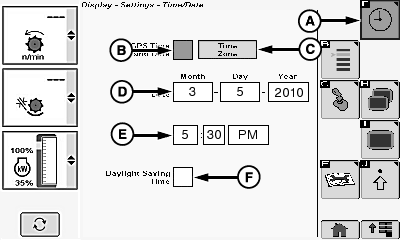
H95744-UN-05OCT10
A - Clock Icon
B - GPS Time and Date Box
C - Time Zone Icon
D - Date Menu (Month, Day, Year)
E - Time Menu (Hours, Minutes, A.M. or P.M.)
F - Daylight Savings Time Box
Touch or press confirm switch when clock icon (A) is highlighted.NOTE: If a Global Position Satellite (GPS) position receiver is detected, checkbox appears and GPS date and time will be available automatically from the receiver.
If no position receiver is detected, date and time must be entered manually.
Touch or press confirm switch when GPS time and date box (B) is highlighted.
- Checked - date and time menus are not selectable. Date and time is set to GPS system.
- Unchecked - date and time menus are selectable. Date and time are not set to GPS system.
Touch or press confirm switch when time zone icon (C) is highlighted.
NOTE: Time zones are shown based off Greenwich Mean Time (GMT).
|
Argentina -2 |
Denmark +1 |
Moscow +3 |
|
Austria +1 |
Germany +1 |
Samara +4 |
|
Australia |
Estonia +2 |
Orenburg +5 |
|
Brisbane +10 |
France 0 |
Omsk +6 |
|
Adelaide +10 |
Finland +2 |
Krasnoyarsk +7 |
|
Perth + 9 |
Greece +2 |
Switzerland +1 |
|
Melbourne +11 |
Iceland 0 |
Slovakia +1 |
|
Bulgaria +2 |
Italy +1 |
South Africa +2 |
|
Sao Paulo -3 |
Hungary +1 |
Sweden +1 |
|
Mato Grosso -4 |
Central America + 5 |
United Kingdom 0 |
|
Vancouver -7 |
Latvia +2 |
Ukraine +2 |
|
Calgary -6 |
Lithuania +2 |
Turkey +2 |
|
Winnipeg -5 |
Netherlands +1 |
Los Angeles - 7 |
|
Toronto -4 |
Norway +1 |
Denver - 6 |
|
Halifax -3 |
Poland +1 |
Chicago -5 |
|
Czech Republic +1 |
Portugal 0 |
Atlanta -4 |
|
Croatia +1 |
Romania +2 |
Once appropriate time zone is chosen from menu, touch or press confirm switch.
Date Settings:
Touch or press confirm switch when desired date menu (D) is highlighted:
- Month
- Day
- Year
Once desired choice is made from menu, touch or press confirm switch.
Time Settings:
Touch or press confirm switch when desired time menu (E) is highlighted:
- Hours
- Minutes
- A.M. or P.M.
Once desired choice is made from menu, touch or press confirm switch.
Touch or press confirm switch when daylight savings time box (F) is highlighted.
- Checked - time automatically updates if daylight savings time is used in your country/region.
- Unchecked - time must be updated manually when daylight savings time changes.
H95878-UN-29MAR10
Main Menu Icon (Display) / Main Menu Switch (Armrest)
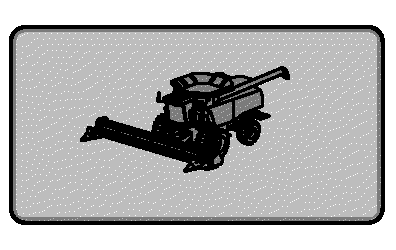
H95845-UN-31MAR10
Combine Main
Application Icon
Touch or press confirm switch when combine main page icon is highlighted.
|
OUO6075,0000650-19-20101005 |