Performance Monitor Application
H95878-UN-29MAR10
Main Menu Icon (Display) / Main Menu Switch (Armrest)
H95847-UN-12OCT10
Performance Monitor
Application Icon
Touch or press confirm switch when performance monitor icon is highlighted.
Performance Monitor Menu:
H95803-UN-05OCT10
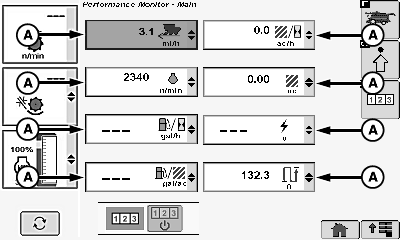
A - Performance Monitor Menu
Touch or press confirm switch when desired performance monitor menu (A) is highlighted.Reconfigured performance monitor menu appears with the following:
- Average Fuel Consumption Per Area (gal./acre, L/ha, gal./ha, L/acre)
- Instantaneous Area Per Hour
- Average Area Per Hour
- Area Harvested (Accumulates with recording ON)
- Distance (Accumulates at all times. Not dependent on recording status)
- Instantaneous Fuel Consumption Per Hour (gal./hr., L/hr)
- Harvesting Productivity Per Hour (Volume or Weight)
- Weight Counter
- Moisture Counter
Touch or press confirm switch when desired menu option is highlighted.
H95810-UN-05OCT10
H95811-UN-23MAR10
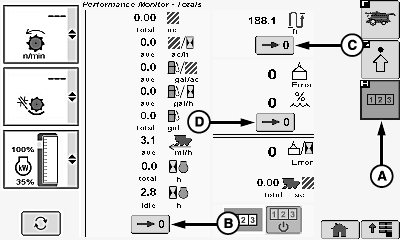
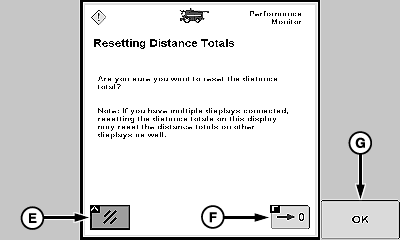
A - Totals Icon
B - Area Counter Reset Icon
C - Distance Counter Reset Icon
D - Weight and Moisture Reset Icon
E - Cancel Icon
F - Reset Icon
G - OK Icon
Performance Monitor Clearing:
Touch or press confirm switch when totals icon (A) is highlighted.
Touch or press confirm switch when desired counter reset icon is highlighted:
NOTE: Clearing area, distance, weight and moisture numbers from this screen will not clear Client, Farm, Field, and Crop Totals.
Only counters on this screen are cleared.
-
Area Counter Reset Icon (B)
- Shows total area traveled since being reset.
-
Distance Counter Reset Icon (C)
- Shows total distance traveled since being reset.
-
Weight and Moisture Counter Reset Icon (D)
- Shows weight and moisture numbers since being reset.
Warning screen appears asking if you want to reset desired total.
IMPORTANT: If multiple displays are connected, resetting totals on this screen may reset totals on other displays as well.
NOTE: Touch or press confirm switch when cancel icon (E) is highlighted to cancel and return to previous screen.
Touch or press confirm switch when reset icon (F) or OK icon (G) is highlighted to zero totals.
Performance Monitor Advanced Settings:
H95813-UN-05OCT10
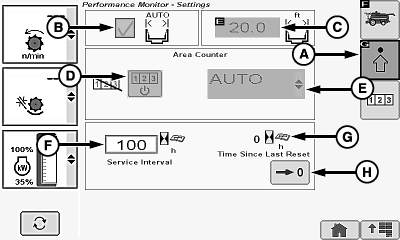
A - Advanced Settings Icon
B - Auto Width Box
C - Header Width Box
D - Recording ON/OFF Status
E - Recording Menu
F - Service Interval
G - Time Since Last Reset
H - Reset Icon
Touch or press confirm switch when advanced settings icon (A) is highlighted.-
Auto Width Box (B)
NOTE: Should always be checked and disabled from operator.
-
Header Width Box (C)
-
NOTE: Should always be disabled from operator.
Automatically detected from settings made in Header Setup Screen.
-
NOTE: Should always be disabled from operator.
-
Recording ON/OFF Status (D)
NOTE: Should always be disabled from operator.
-
Recording Menu (E)
NOTE: Should always be disabled from operator and always set
to AUTO.
-
Service Interval (F)
-
NOTE: Alarm sounds and message appears on display within 20
hours of service interval setting.
Interval is adjustable between 0 - 999 hours. Service interval must be reset to zero after service is performed.
-
NOTE: Alarm sounds and message appears on display within 20
hours of service interval setting.
-
Time Since Last Reset (G)
- Shows number of engine hours since service was last reset.
-
Reset Icon (H)
- Clears hours since last service counter.
H95878-UN-29MAR10
Main Menu Icon (Display) / Main Menu Switch (Armrest)
H95845-UN-31MAR10
Combine Main Application Icon
Press main menu icon or switch.Touch or press confirm switch when combine main page icon is highlighted.
|
OUO6075,00006F9-19-20101007 |