Harvest Smart Feed Rate—Additional Information (Unloading Auger ON and Field Conditions)
-
NOTE:
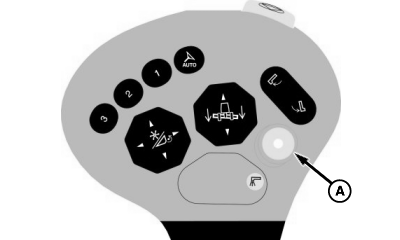
H95955-UN-01NOV10A - Unloading Auger Drive Switch
Harvest Smart maintains ground speed of machine when unloading auger button is pressed (if multi-function lever is not moved rearward). When unloading system is engaged, system remains in control; however, response is limited to prevent sudden changes that would overrun grain cart.If unloading system is engaged, Harvest Smart cannot be activated.
When unloading auger drive switch (A) is pressed, Harvest Smart will still be active. If operator wants manual control while unloading, pull multi-function lever rearward until machine slows slightly to temporarily deactivate system. Operator now has full control of ground speed. When unloading auger button is shut OFF, system automatically reactivates and controls ground speed. - When crop conditions are highly variable, operator should move multi-function lever rearward to slow and limit entry speed into heavier crop conditions. After 5 seconds move multi-function lever fully forward.
-

H94473-UN-31MAR10Combine Setup Icon
H96199-UN-05OCT10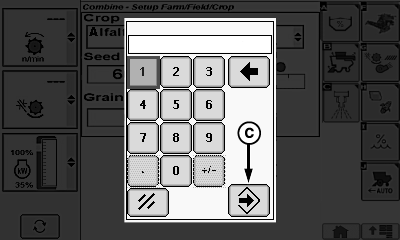
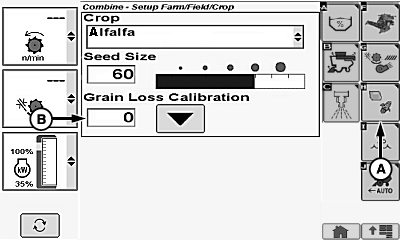
H96200-UN-05OCT10A - Crop Setup Icon
B - Grain Loss Calibration Value
C - Enter/Accept Icon
If system consistently makes machine drive faster than normal, increase grain loss calibration value by 2 or 3. If system consistently makes machine drive slower than normal, decrease grain loss calibration value by 2 or 3.- Touch or press confirm switch when combine setup icon is highlighted.
- Touch or press confirm switch when crop setup icon (A) is highlighted.
- Touch or press confirm switch when grain loss calibration value (B) is highlighted.
-
Touch or press confirm switch when desired digits are highlighted.
NOTE: Repeat procedure until desired value is shown.
- Touch or press confirm switch when enter/accept icon (C) is highlighted.
|
OUO6075,000070B-19-20101213 |