Harvest Smart Feed Rate—Best Practices
Calibrate System:

H94473-UN-31MAR10
Combine Setup Icon
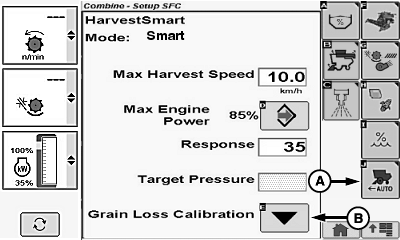
H95952-UN-05OCT10
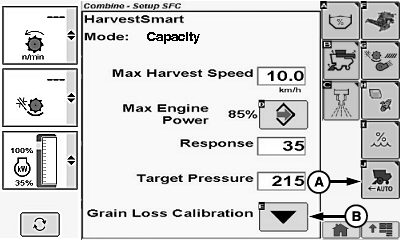
H95953-UN-05OCT10
A - Harvest Smart Feed Rate Setup Icon
B - Grain Loss Calibration Icon
Touch or press confirm switch when combine setup icon is highlighted.Touch or press confirm switch when Harvest Smart Feed Rate setup icon (A) is highlighted.
Operate machine in desired crop at acceptable throughput and loss level for 15-20 seconds ensuring steady operation (allows rotor pressure and loss levels to steady).
Touch or press confirm switch when grain loss calibration icon (B) is highlighted. Calibrating sets the following parameters:
- Target Volume (Throughput)
- Target Loss
- VisionTrak Loss Calibration Factor
Activate System:
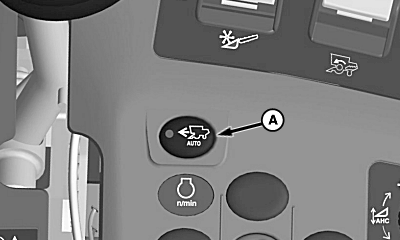
H95948-UN-06APR10
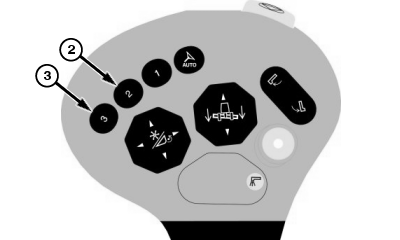
H95956-UN-01NOV10
A - Harvest Smart Feed Rate Enable Switch
Press Harvest Smart feed rate enable switch (A) until Smart or Capacity mode is shown on display:- Smart mode - is the recommended method.
- Capacity mode - if losses are not a concern or VisionTrak is not reliable due to conditions.
Press activation buttons 2 or 3 on multi-function lever to activate system and move multi-function lever forward allowing system to increase speed accordingly to crop density.
NOTE: System will not command a speed greater than multi-function lever position.
|
OUO6075,000070C-19-20101213 |