Yield Calibration
IMPORTANT:
H94478-UN-31MAR10
Diagnostic Icon
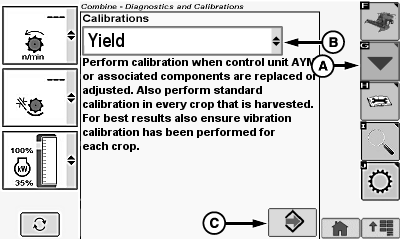
H94928-UN-11OCT10
A - Calibration Icon
B - Calibrations Menu
C - Enter/Accept Icon
Calibration must be performed every year and in every crop that is harvested to achieve accurate grain weight measurements.For best results also ensure that vibration calibration has been performed for each crop.
Touch or press confirm switch when diagnostic icon is highlighted.
Touch or press confirm switch when calibration icon (A) is highlighted.
Touch or press confirm switch when calibrations menu (B) is highlighted.
Touch or press confirm switch when Yield is highlighted.
Touch or press confirm switch when enter/accept icon (C) is highlighted.
NOTE:
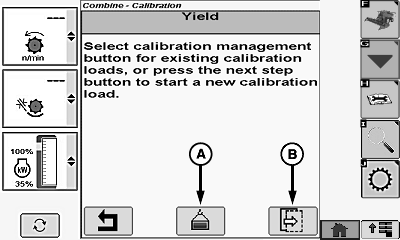
H96031-UN-05OCT10
A - Calibration Management Icon
B - Next Page Icon
Calibration management icon (A) is not enabled for initial calibration.Touch or press confirm switch when next page icon (B) is highlighted.
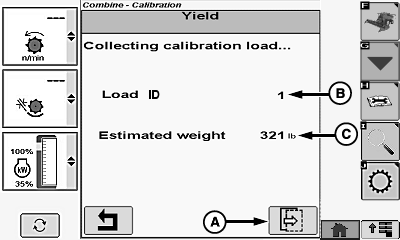
H96032-UN-05OCT10
A - Next Page Icon
B - Load ID
C - Estimated Weight
Touch or press confirm switch when next page icon (A) is highlighted.- Load ID (B) - shows current load ID number during calibration.
-
NOTE: A minimum 1,360 kg (3,000 lb.) of crop must be harvested
for calibration to be accepted.
Estimated Weight (C) - shows combine collected weight for load collected by mass flow system during calibration.
Update Actual Weight Values:
H96033-UN-05OCT10
H96034-UN-05OCT10
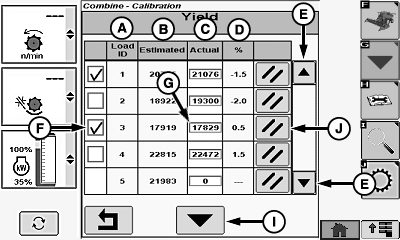
A - Load Identification
B - Estimated Weight
C - Actual Weight
D - Percent Scaling
E - Up/Down Arrow Icons
F - Calibration Selection Box
G - Actual Weight Menu
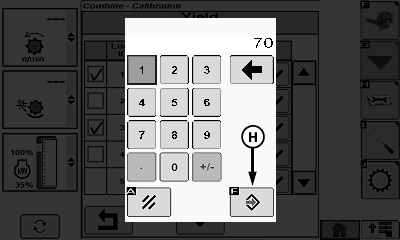
H - Enter/Accept Icon
I - Calibration Icon
J - Clear Icon
-
NOTE: 13 load identification numbers can be saved before memory
is full and a load ID number must be deleted.
Load Identification (A) - shows collected load ID numbers for future references. - Estimated Weight (B) - shows weight for load collected by mass flow system during calibration.
- Actual Weight (C) - shows operator entered load weight.
-
Percent Scaling (D) - shows percentage of difference between
estimated weight and actual weight.
Formula:
% Error
=
Estimated Weight (minus —) Actual Scale Weight ÷ Actual Scale Weight
X
Percent Scaling
Example:
(0.5%)
=
(17,919 — 17,829) ÷ (17,829)
X
(100%)
- Up/Down Arrow Icons (E) - used to scroll through listing to find desired load ID.
NOTE: Checkbox remains unavailable until actual scale weight is entered by operator.
- Limited Accuracy - user calibration procedure has not been performed. System defaults to a fixed internal calibration value which is not adjustable.
- Medium Accuracy - user has collected and selected one to three loads. System uses these values to adjust the internal calibration value.
-
Highest Accuracy - user has collected and selected a minimum
of four calibration loads. System uses these values to adjust the
internal calibration value. Up to 13 loads are allowed.
NOTE: 13 load identification numbers can be saved before memory
is full and a load identification number must be deleted.
Touch or press confirm switch when desired calibration selection box (F) is highlighted.
Touch or press confirm switch when desired actual weight menu (G) is highlighted.
Touch or press confirm switch when desired digits are highlighted.
NOTE: Repeat procedure until actual weight value is shown.
Touch or press confirm switch when enter/accept icon (H) is highlighted.
NOTE: Calibration icon must be selected to update yield calibration values. If return/back icon is highlighted, values are not saved or updated.
Touch or press confirm switch when calibration icon (I) is highlighted to update yield calibration values.
Clear Load ID and Yield Values:
NOTE: 13 load identification numbers can be saved before memory is full and a load identification number must be deleted.
Touch or press confirm switch when up/down arrow icons are highlighted to scroll list until desired load ID is shown.
Touch or press confirm switch when desired load ID clear icon (J) is highlighted.
|
OUO6075,0000745-19-20101011 |