Moisture Sensor Temperature Calibration

H94478-UN-31MAR10
Diagnostic Icon
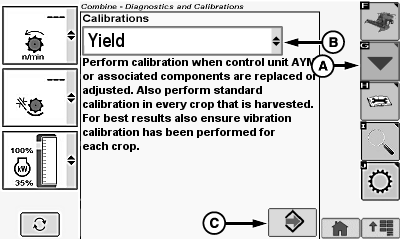
H94928-UN-11OCT10
A - Calibration Icon
B - Calibrations Menu
C - Enter/Accept Icon
Touch or press confirm switch when diagnostic icon is highlighted.Touch or press confirm switch when calibration icon (A) is highlighted.
Touch or press confirm switch when calibrations menu (B) is highlighted.
Touch or press confirm switch when Moisture Sensor Temperature is highlighted.
Touch or press confirm switch when enter/accept icon (C) is highlighted.
NOTE:
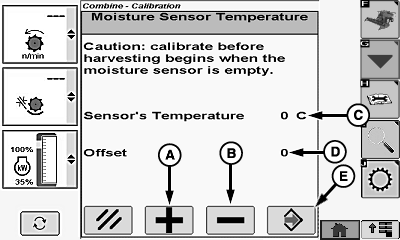
H96030-UN-05OCT10
A - Plus (+) Icon
B - Minus (-) Icon
C - Sensor Temperature
D - Offset
E - Enter/Accept Icon
Calibration must be done before harvesting begins and when moisture sensor is empty.Touch or press confirm switch when plus (+) icon (A) or minus (-) icon (B) is highlighted.
NOTE: Sensor temperature must be set to the current ambient air temperature.
Increase or decrease until desired sensor temperature (C) is shown.
NOTE: Offset (D) automatically adjusts when ambient sensor temperature is set.
Touch or press confirm switch when enter/accept icon (E) is highlighted to save sensor temperature.
|
OUO6075,0000746-19-20101005 |