Chopper Stationary Knife Blades—Replacing
 CAUTION:
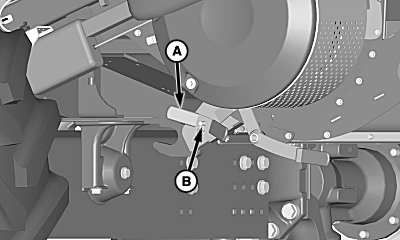
H98140-UN-21SEP10
A - Wing Nut
B - Tension Rod
Shut OFF engine, set parking brake and remove key. Knife blades are sharp.Loosen wing nut (A) on chopper.
Move adjustment handle upward until knifebank is at bottom of adjustment slot.
NOTE: Retain bushing at outer ends of knifebank for later assembly.
Support knifebank and remove tension rod (B) by pushing out right side of machine.
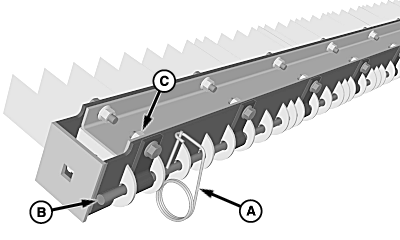
H82430-UN-14FEB05
A - Pin
B - Retaining Rod
C - Lock Nuts
Remove pin (A) from retaining rod (B).Loosen lock nuts (C) on clips holding retaining rod.
Slide retaining rod until it clears knives that need to be replaced.
Reverse knives for additional usage or replace knives if worn on both sides.
Align retaining rod with knives.
Tighten lock nuts on clips and install pin.
NOTE: Reposition bushing at outer ends of knifebank.
Install knifebank assembly and slide tension rod from right side of machine.
Install wing nut and adjust knifebank to desired position.
IMPORTANT: Knifebank must be fully disengaged for corn.
Tighten wing nut to lock knifebank into position.
|
OUO6075,00009C0-19-20100921 |