Reconfigure Performance Monitor Settings
NOTE:
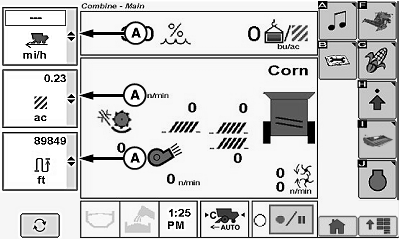
H98416-UN-04OCT10
A - Performance Monitor Setting Icons
Shows detailed performance monitor settings. Allows operator to reconfigure screen and provides the ability to monitor three items at once. Items vary depending upon machine configuration.Touch or press confirm switch when desired performance monitor setting icon (A) is highlighted.
Performance monitor setting menu displays the following:
- Vehicle Ground Speed
- Global Position Satellite (GPS) Speed
- Engine Speed
- Fuel Per Hour
- Fuel Per Area
- Area Per Hour
- Area Counter
- Battery Voltage
- Distance Counter
- Crop Weight Counter
- Crop Moisture Counter
- Total Machine Area Counter
Touch or press confirm switch when desired performance monitor setting is highlighted.
Repeat procedure on remaining menus as desired.
|
OUO6075,0000A0C-19-20101004 |