Threshing Elements and Tines (Variable Stream Rotor)—Remove and Install
Threshing Elements
-
IMPORTANT:
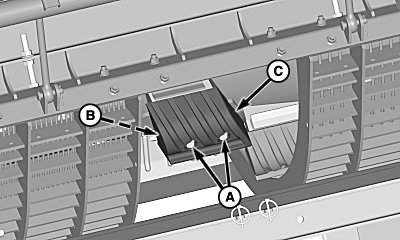
H94732-UN-22SEP09A - Cap Screws
B - Threaded Strap
C - Threshing Element
Rotor is a balanced assembly. Elements must be replaced in groups of three to maintain balance. When installing more than one kit, do not mix and match elements. Replacement kits are available through service parts and include cap screws with pre-applied Thread Lock and Sealer. Always use supplied cap screws. Elements that become loose may result in machine damage.Remove concave sections as needed to access threshing elements. (See Concave Sections—Remove and Install in this section.)
-
Inspect wear on threshing elements using KXE10110 Clearance Gauge.
-
Remove and discard cap screws (A) and retain threaded strap (B) from threshing element (C) as needed.
-
H94747-UN-24SEP09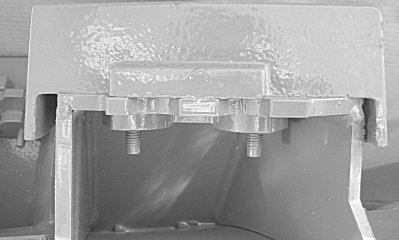
H97768-UN-25AUG10Fully Seated
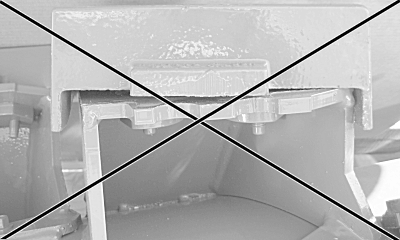
H97769-UN-26AUG10Not Fully Seated
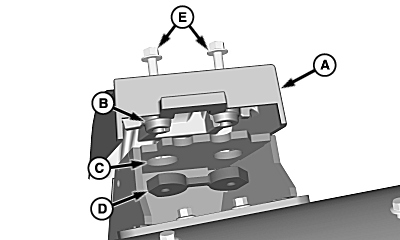
A - Threshing Element
B - Element Boss
C - Rotor Base Hole
D - Threaded Strap
E - Cap Screws
Install replacement threshing element (A) onto rotor base. (Use Threshing Element location diagram to identify threshing elements).Threshing Element Groups
Group 1 Elements = 1, 2, 3
Group 2 Elements = 4, 5, 6
Group 3 Elements = 7, 8, 9
Group 4 Elements = 10, 11, 12
Group 5 Elements = 13, 14, 15
-
Verify element boss (B) is fully seated through rotor base holes (C).
-
Install previously removed threaded strap (D) and supplied cap screws (E).
-
Tighten cap screws to specification.
Item Measurement Specification Threshing Elements Cap Screws Torque 87 ± 9 N·m (64 ± 7 lb.-ft.) -
IMPORTANT: Verify that elements are seated properly after tightening.
Rice threshing elements are taller than corn/grain threshing elements. Concave level must be adjusted.
Adjust concave levelness. (See Concave Leveling in this section).
Separator Tines
-
IMPORTANT:
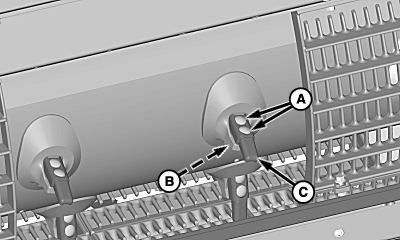
H94733-UN-22SEP09A - Round Head Cap Screws
B - Lock Nuts (2 used)
C - Separator Tines
Rotor is a balanced assembly. Tines must be replaced in pairs to maintain balance. When installing more than one kit, do not mix and match tines. Always use supplied cap screws. Tines that become loose may result in machine damage.Remove separator grates as needed to access separator tines. (See Concave Sections—Remove and Install in this section.)
-
Inspect wear on separator tines using KXE10110 Clearance Gauge.
-
NOTE: For ease of removal, shift rotor gear case to neutral position.
Remove and discard round head cap screws (A), nuts (B) and separator tines (C) as needed.
-
IMPORTANT:
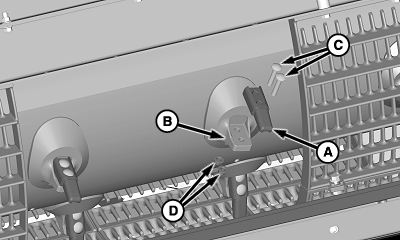
H94751-UN-25SEP09A - Separator Tine
B - Rotor Base
C - Round Head Cap Screws
D - Nuts
Separator tines MUST be replaced in pairs to maintain proper balance.Separator Tine Pairs
1-2
11-12
3-4
13-14
5-6
15-16
7-8
17-18
9-10
19-20
Install supplied separator tine (A) onto rotor base (B). (Use Separator Tine location diagram to identify separator tines).
-
Install supplied round head cap screws (C) and retain with nuts (D).
-
Tighten nuts to specification.
Item Measurement Specification Tine Cap Screws Torque 75 ± 11 N·m (55 ± 8 lb.-ft.)
|
OUO6075,0000B82-19-20110614 |