Phone Book (Premium Radio)
NOTE:
H95878-UN-29MAR10
Main Menu Icon (Display) / Main Menu Switch (Armrest)
H105094-UN-28MAR12
Phone Application Icon
H104857-UN-27MAR12
H104858-UN-27MAR12
A contact entry CANNOT be edited through armrest display. Contact must be edited through cell phone, and phone must be re-synced with radio Bluetooth® (see Phone Settings in this section for further information).
Press main menu icon or switch.
Touch or press confirm switch when phone application icon is highlighted.
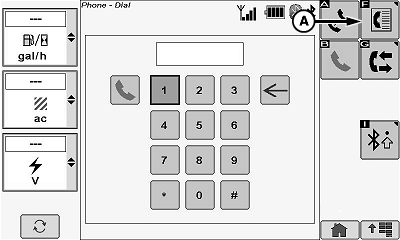
Touch or press confirm switch when phone book icon (A) is highlighted.
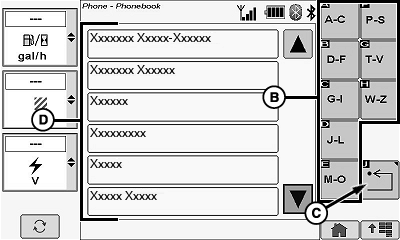
Alphabetic Softkeys (B)
Allows operator to narrow the number of names in the contact list to those names beginning with selected letter icon.
Touch or press confirm switch when desired alphabetic icon is highlighted.
Return/Back Icon (C)
Allows operator to return to the previous page.
Touch or press confirm switch when return/back icon is highlighted.
Phone Book Contact List (D)
NOTE: Maximum number of phone book entries is 650. Maximum number of characters in a phone number is 20. Maximum number of characters in a phone book name is 20.
Selecting a number on the phone book entry page will directly call that number.
Some phones will not correctly sync with the radio Bluetooth®. When this happens a call cannot be made from the Phone Book page.
Allows operator to select a contact from the listing and will bring up a phone book entry page listing the contacts phone numbers (cell, work, home).
Touch or press confirm switch when desired contact is highlighted.
|
Bluetooth is a registered trademark of Bluetooth SIG |
OUO6075,0000E4C-19-20120625 |