Phone Directories (Premium Radio)
H95878-UN-29MAR10
Main Menu Icon (Display) / Main Menu Switch (Armrest)
H105094-UN-28MAR12
Phone Application Icon
H104863-UN-27MAR12
H104864-UN-28MAR12
Touch or press confirm switch when phone application icon is highlighted.
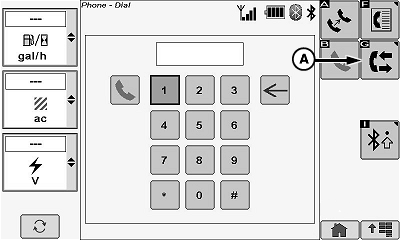
NOTE: Touch or press confirm switch when directories icon (A) is highlighted. An incoming call from a contact shows the contacts name and telephone number. An incoming call received from an unknown contact appears on display as Unknown.
A missed call screen appears with the callers name and phone number (if caller is listed in phone book). Unknown appears on screen if caller was not listed in phone book.
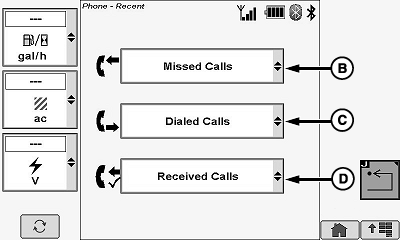
The directories page allows operator to review the following:
- Missed Calls (B)
- Dialed Calls (C)
- Received Calls (D)
Touch or press confirm switch when desired calls menu is highlighted.
NOTE: A call list appears from the previously selected menu. The persons name and telephone number appears (if caller is listed in phone book) with an exact time. Operator can choose from the desired listing to call that person or number back.
|
OUO6075,0000E4D-19-20120402 |