VisionTrak Display
H94445-UN-19NOV09
- Engine running.
- Road transport disconnect switch in field position.
- Header switch and separator switch engaged.
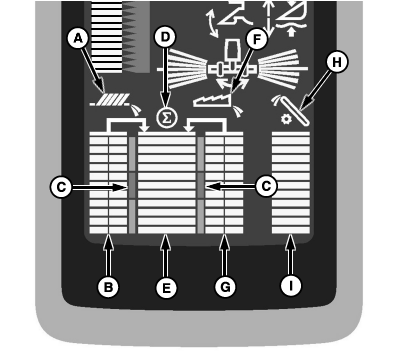
VisionTrak monitor checks grain loss by measuring a representative sample of losses over the cleaning shoe and through the separator. VisionTrak continuously monitors machine performance to enable operator to use maximum machine capacity. A change in loss rate is indicated by bar graphs.
Grain loss information is displayed by three vertical bar graphs.
Shoe Symbol (A): displays when system is functioning correctly.
Shoe Loss Indicator (B): shows grain loss from shoe.
- Averaged shoe loss is shown by two adjacent vertical bar graphs.
Normal Range (C) (Green Range): lines near center range indicate acceptable loss levels.
Summation Symbol (D): displays above bar graph.
Total Loss Indicator (E): shows an average of grain loss from shoe and separator area.
- Total loss is shown on vertical bar graph located in center of display.
- Two horizontal lines near center range indicate calibrated normal range.
Separator Symbol (F): displays when system is functioning correctly.
Separator Loss Indicator (G): shows grain loss from separator area.
- Averaged separator loss is shown by two adjacent vertical bar graphs.
Tailings Symbol (H): displays when system is functioning correctly.
Tailings Volume Indicator (I): shows volume of tailings return.
- Tailings volume is displayed as a percentage of total full in vertical bar graph.
- Tailings volume is defined as total amount of material (grain and material other than grain) moving through the tailings elevator.
NOTE: If bar graph shows full or warning alarm screen appears, stop machine and adjust chaffer and sieve.
Bar graph is a visual guide which can be referred to periodically to see if an increase or decrease in tailings volume occurs.
If bar graph shows an increase in volume, slow ground speed and see if bar graph goes back into acceptable loss range.
If bar graph does not go back into acceptable loss range after slowing ground speed, disengage header switch. Bar graph should zero itself (nothing showing in bar graph). Engage header switch, bar graph should go back into acceptable loss range.
H70551-UN-02JAN02
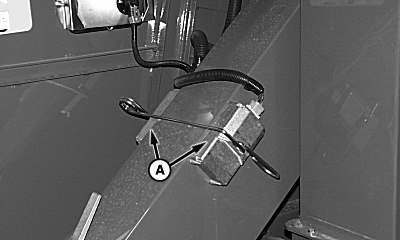
Tailings Sensors (S660 and S670)
H105437-UN-17MAY12
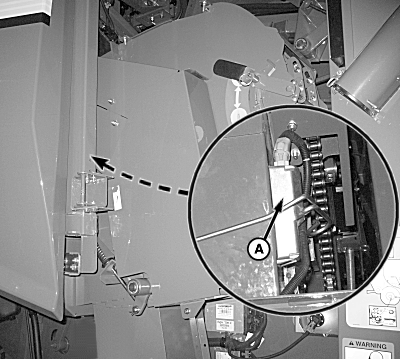
Tailings Sensors (S680 and S690)
A - Tailings Sensors
If tailings sensor display consistently reads full (all bars lit) when not harvesting or empty (no bars lit) when harvesting, it may indicate that the sensor lens is coated with material or seal under lens has allowed dust to enter.
 CAUTION: Tailings sensor is a Class 1 laser product and emits
laser radiation when powered. When servicing or removing tailings
sensors, use caution and do not view beam directly.
CAUTION: Tailings sensor is a Class 1 laser product and emits
laser radiation when powered. When servicing or removing tailings
sensors, use caution and do not view beam directly.
Key switch must be turned OFF and tailings sensor must be unplugged before servicing or removing sensors.
DO NOT operate sensor with lens removed. Accessible laser emission when lens is in place:
- 850 nm
- 500 nsec pulse width
- ≤ 500 Hz rep rate
- < 90 nJ per pulse
- 43 uW average power
- Class 1 levels (Eye Safe)
Accessible laser emission levels if sensor was operated with lens removed are:
- 850 nm
- 500 nsec pulse width
- ≤ 500 Hz rep rate
- < 380 nJ per pulse
- 188 uW average power
- Class 3R Levels (small potential for eye injury)
- Remove tailings sensors (A) to inspect and clean lenses if needed.
- If lenses are clean, remove and check for dust. If dust is found, completely clean area and reassemble lens onto unit making sure that gasket is sealing.
-
Verify lens is retained with all previously removed screws prior
to installation.
CAUTION: Failure to install plastic cover prior to replacement
of sensors on elevator may cause malfunction, incorrect harvest readings
or sensor damage, and could allow for potentially hazardous eye exposure
when sensor is removed.
- Install sensor and test system.
- If display continues to read full or empty, contact your John Deere dealer.
|
OUO6075,0000E93-19-20120517 |