ClimaTrak™ Automatic Temperature Control
H96249-UN-30APR10
H96250-UN-30APR10
Fan Speed
NOTE: When operating in cold environments it is best to point air vents towards cab floor and turn fan speed to automatic position. This helps circulate air flow throughout the cab.
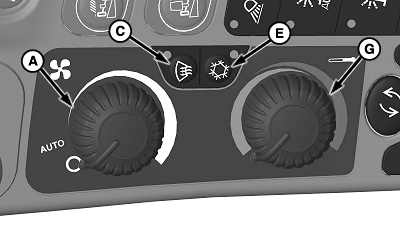
Fan Speed Control Dial (A): adjusts fan speed and amount of air coming out of louvers.
- Off Position - all power to system is OFF.
-
Automatic Position - fan speed is determined by difference between
selected temperature and actual cab temperature.
NOTE: As temperature approaches setpoint, fan speed decreases.
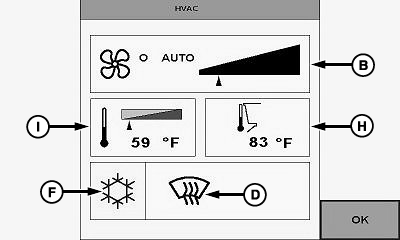
Fan Speed Indicator (B): indicator arrow moves in relation to desired fan speed adjusted setting.
Defrost
Defrost Switch (C): manually opens defrost vents.
NOTE: Indicator light illuminates when defrost is ON.
Air conditioner turns ON when defrost switch is first pressed. This allows moisture to be removed from the air and allows dry air to be blown on the windows. Press air conditioner switch to turn OFF.
- Defrost helps remove moisture from air even in heat mode.
Defrost Indicator (D): toggles icon ON/OFF when defrost switch is pressed.
Air Conditioner
Air Conditioner Switch (E): activates air conditioner to cool cab.
NOTE: Indicator light illuminates when air conditioning is ON.
Air Conditioner Icon (F): toggles icon ON/OFF when air conditioner switch is pressed.
Temperature Control
Temperature Control Dial (G): adjusts temperature of cab. Turn dial to red zone to increase temperature and blue zone to decrease temperature.
NOTE: Outside ambient temperature (H) shows current air temperature.
Temperature Control Indicator (I): indicator arrow moves in relation to desired temperature adjusted setting.
|
ClimaTrak is a trademark of Deere & Company |
OUO6075,00010C3-19-20120308 |