Video Application (If Equipped)
 CAUTION: Do not rely on a camera for collision avoidance or
bystander detection. To avoid possible injury or death to operator
or others, always remain alert and aware of surroundings when operating
the machine. Read and understand Avoid Backover Accidents in safety
section.
CAUTION: Do not rely on a camera for collision avoidance or
bystander detection. To avoid possible injury or death to operator
or others, always remain alert and aware of surroundings when operating
the machine. Read and understand Avoid Backover Accidents in safety
section.
IMPORTANT:
- Correctly understand whether camera or video application is ”mirrored”.
- Mount camera in a sturdy and secure location.
- Understand camera’s field of view.
- Keep camera properly serviced.
- Keep camera lens clean.
H95878-UN-29MAR10
Main Menu Icon (Display) / Main Menu Switch (Armrest)

H95851-UN-31MAR10
Video
Application Icon
Touch or press confirm switch when video icon is highlighted.
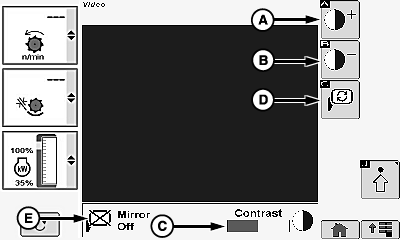
Contrast Adjusting:
H96255-UN-05OCT10
A - Contrast Increase Icon
B - Contrast Decrease Icon
C - Contrast Bar Graph
D - Mirror Icon
E - Mirror ON/OFF
Allows operator to lighten or darken video display.Touch or press confirm switch when desired icon is highlighted:
- Increase Icon (A) - brightens video display.
- Decrease Icon (B) - darkens video display.
NOTE: Contrast bar graph (C) increases or decreases depending on which icon was selected.
Mirror Settings:
Allows operator to mirror image on screen.
Touch or press confirm switch when mirror icon (D) is highlighted.
NOTE: Mirror ON/OFF (E) toggles to alert operator which angle is displayed.
H96254-UN-05OCT10
H95821-UN-05OCT10
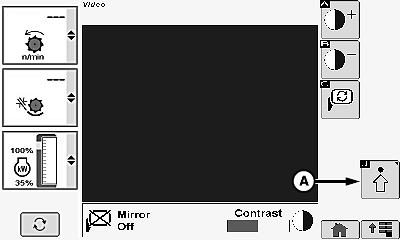
A - Advanced Settings Icon
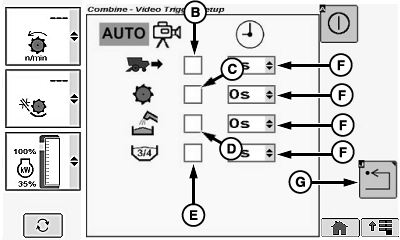
B - Rear Video Trigger
C - Separator Video Trigger
D - Unloading Auger Video Trigger
E - Grain Tank Video Trigger
F - Time Menu
G - Return/Back Icon
Video Setup:
NOTE: Multiple video triggers are supported on the armrest display.
Allows operator to setup and view different areas around machine.
Touch or press confirm switch when advanced settings icon (A) is highlighted.
Screen displays the following:
- Rear View Video Trigger (B)
- Separator Video Trigger (C)
- Unloading Auger Video Trigger (D)
- Grain Tank Video Trigger (E)
NOTE: Video automatically appears on display when a trigger condition is met (example: rear view video appears on display when machine is moved rearward).
Touch or press confirm switch when desired video trigger boxes are highlighted.
- Checked - displays video.
- Unchecked - will not display video.
Touch or press confirm switch when time menu (F) for desired video box is highlighted.
Touch or press confirm switch when desired time is highlighted.
NOTE: Allows camera to remain viewable for an extended time after condition changes (example: rear video remains viewable an extended time even after multi-function lever is moved forward).
Touch or press confirm switch when return/back icon (G) is highlighted.
H95878-UN-29MAR10
Main Menu Icon (Display) / Main Menu Switch (Armrest)
H95845-UN-31MAR10
Combine Main
Application Icon
Touch or press confirm switch when combine main page icon is highlighted.
|
OUO6075,00010DF-19-20120320 |