Radio Function Switches (If Equipped)
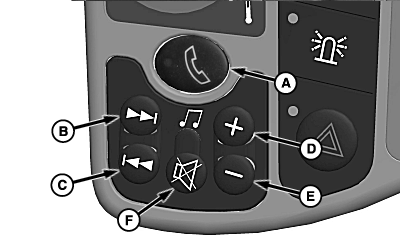
Push-To-Talk Switch (A) 1:
H105408-UN-11MAY12
Seek Forward Switch (B):
- AM/FM/WX/MW/LW: Press switch (short press) to change to next preset.
- AM/FM/WX/MW/LW: Press switch (long press) to SEEK UP.
- XM®: Press switch to change to next/higher channel.
- CD/MP3: Press switch to advance to next available track.
Seek Reverse Switch (C):
- AM/FM/WX/MW/LW: Press switch (short press) to change to previous preset.
- AM/FM/WX/MW/LW: Press switch (long press) to SEEK DOWN.
- XM®: Press switch to change to previous/lower channel.
- CD/MP3: Press switch to go to beginning of current track or to previous track.
Volume Increase Switch (D):
Press switch to increase audio volume.
Volume Decrease Switch (E):
Press switch to decrease audio volume.
Mute Switch (F):
NOTE: Press switch to mute microphone during a phone call.
Press button to mute audio. Press switch to resume play of audio music.
|
XM is a registered trademark of SIRIUS XM Radio Inc. 1 Switch is capped for non-premium radios. |
OUO6075,0001101-19-20120625 |