Radio Source Select
H105093-UN-28MAR12
Infotainment Icon / Audio Application Icon
H104953-UN-26MAR12
H104722-UN-26MAR12
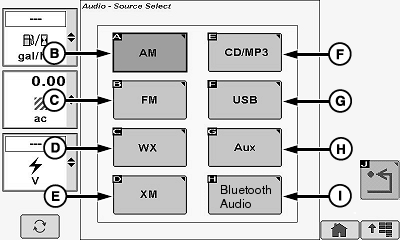
Source Select Screen (United States/Canada)
H104723-UN-26MAR12
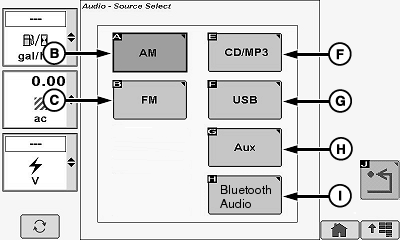
Source Select Screen (Export)
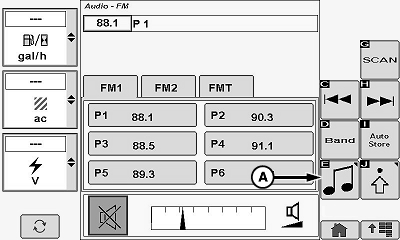
Touch or press confirm switch when infotainment icon or audio application icon is highlighted.Touch or press confirm switch when source select icon (A) is highlighted.
Touch or press confirm switch when desired source icon is highlighted:
- AM (B)
- FM (C)
- Weather (D) 1
- XM® Radio Services (Premium Radio Only) (E) 2
- CD/MP3 (Premium Radio Only) (F)
- Universal Serial Bus (USB) (Premium Radio Only) (G)
- Auxiliary (AUX) (H)
- Bluetooth® Audio (Premium Radio Only) (I)
Radio OFF; selecting Infotainment Icon or Audio Application Icon navigates to source select screen. Selecting a source from this screen turns radio ON to selected source.
Radio ON; selecting Infotainment Icon or Audio Application Icon navigates to currently selected source’s home page.
Selecting source icon from a radio home page will navigate to source select screen. Selecting a source from this screen will change radio to selected source.
|
XM is a registered trademark of SIRIUS XM Radio Inc. Bluetooth is a registered trademark of Bluetooth SIG 1 Only available in North America. 2 Only available in United States/Canada. |
OUO6075,0001122-19-20120625 |