AM/FM/WX Home Page
NOTE:
H105093-UN-28MAR12
Infotainment Icon / Audio Application Icon
H105279-UN-26APR12
FM Page
AM/WX home page is similar to FM home page.Touch or press confirm switch when infotainment icon or audio application icon is highlighted.
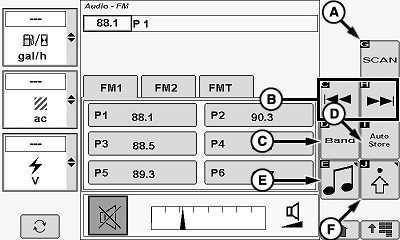
Scan Icon (A)
NOTE: Scan is disabled by touching or pressing confirm switch when icon is highlighted.
Allows operator to scan through available stations on selected radio band. Current station plays four—eight seconds (depending on time to produce audio) before scanning again.
Touch or press confirm switch when scan icon is highlighted.
Channel Up/Down Icons (B)
NOTE: Six presets can be programmed for each radio band (FM1, FM2, FMT, AM, AMT, WX).
While in scan mode, scan is disabled by touching or pressing confirm switch when icons are highlighted.
Channel down and channel up allows operator to cycle through the six preset stations (if previously saved into memory).
Touch or press confirm switch when desired channel down icon or channel up icon is highlighted.
Band Icon (C)
-
NOTE: XM® Radio Services is the last tab of presets that was active. All the
rest cycle to the first tab of each band.
FM1, AM, WX (Weather), XM
Band Icon (Armrest Display Screen):
Allows operator to toggle through available radio bands on the armrest display screen.
Touch or press confirm switch when band icon is highlighted to toggle through available radio bands.
- FM1, FM2, FMT, AM, AMT, WX or XM1, XM2, XM3 (if first selected by source (SRC) key on radio)
Band (BND) Key (On Radio):
Allows operator to toggle through available radio bands through the radio.
Press band (BND) key on radio to toggle through available radio bands.
Auto Store Icon (D)
NOTE: Auto store icon is not available on WX home page.
Auto store allows operator to store the 6 strongest frequencies in the FMT and AMT band.
Touch or press confirm switch when auto store icon is highlighted to store the 6 strongest frequencies.
NOTE: Press and hold Band (BND) key on radio for two seconds to start Auto Store.
Source Select Icon (E)
Allows operator the ability to cycle through radio tuner sources and external sources (see Radio Source Select in this section for additional information).
Touch or press confirm switch when select source icon is highlighted to cycle through available choices.
Audio Settings Icon (F)
Allows operator to change desired audio settings. Refer to Audio Settings later in this section for further information.
Mute Icon (A)
H105280-UN-02MAY12
FM Page
H105285-UN-02MAY12
Weather (WX) Page
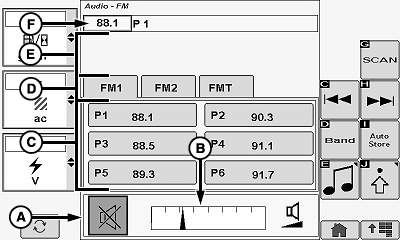
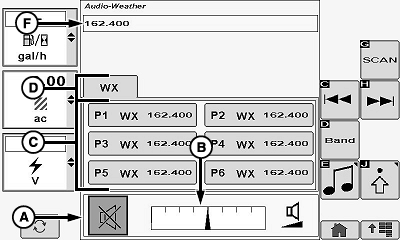
Allows operator to mute radio sound level.Touch or press confirm switch when mute icon is highlighted.
Volume Bar Graph Area (B)
Allows operator to adjust current sound level.
Touch plus (+) symbol or minus (-) symbol or rotate selection dial to increase or decrease bar graph settings.
Channel Presets 1—6 (C)
Allows operator to select preset stations (lowest frequency available is default).
Touch or press confirm switch when desired preset station is highlighted.
Press and hold (screen icon or confirm button) for two seconds to store active station frequency to preset.
Radio and display buttons are synchronized.
Radio Band Tabs (AM/FM/WX) (D)
Allows operator to view additional preset stations on other tabs.
Touch or press confirm switch when desired radio band tab is highlighted to view additional preset stations.
Artist/Song Name Display Area (E)
Allows operator to view artist name and song name (if available) from current radio station.
Radio Station Frequency Display Area (F)
Allows operator to view radio station frequency and channel preset number (if previously saved into memory).
|
XM is a registered trademark of SIRIUS XM Radio Inc. |
OUO6075,0001123-19-20120625 |