USB Home Page (Premium Radio)
H105093-UN-28MAR12
Infotainment Icon / Audio Application Icon
H105277-UN-26APR12
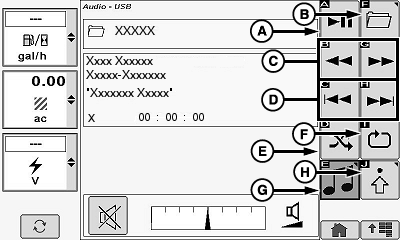
Pause/Play Icon (A)
Allows operator to pause audio and resume playing audio.
Touch or press confirm switch when pause/play icon is highlighted. Radio begins playing first song in each folder upon navigation.
Folder Select Icon (B)
Allows operator to view the folder select page.
Touch or press confirm switch when folder select icon is highlighted.
Fast Reverse/Fast Forward Icon (C)
Allows operator to fast forward or fast reverse current playing audio.
Touch or press confirm switch when desired fast forward or fast reverse icon is highlighted. Press and hold available.
Previous Track/Next Track Icon (D)
Allows operator to select the previous song or advance to the next song.
Touch or press confirm switch when desired previous track or next track icon is highlighted.
Random Folder/Random All (E)
Allows operator to cycle through the following choices:
- Random Folder
- Random All
- Random Off
Touch or press confirm switch when random icon is highlighted to cycle through choices.
Repeat Track/Repeat Folder/Repeat All Icon (F)
Allows operator to cycle through the following:
- Repeat Track
- Repeat Folder
- Repeat Off
Touch or press confirm switch when repeat icon is highlighted to cycle through available choices.
Source Select Icon (G)
Allows operator the ability to cycle through radio tuner sources and external sources (see Radio Source Select in this section for additional information).
Touch or press confirm switch when source select icon is highlighted to cycle through available choices.
Audio Settings Icon (H)
Allows operator the ability to change audio settings (see Radio Settings in this section for additional information).
Touch or press confirm switch when select audio settings icon is highlighted.
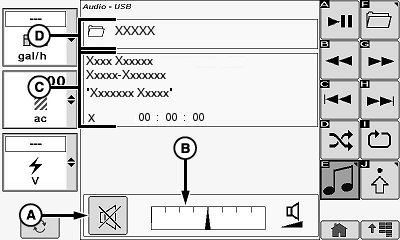
Mute Icon (A)
H105278-UN-02MAY12
Touch or press confirm switch when mute icon is highlighted.
Volume Bar Graph Area (B)
Allows operator to adjust current sound level.
Touch plus (+) symbol or minus (-) symbol or rotate selection dial to increase or decrease bar graph settings.
Display Area (C)
Allows operator to view the following:
- Artist Name
- Album Name
- Song Name
- Track Number
- Elapsed Time
Folder Name (D)
Allows operator to view folder name (if folder was previously named).
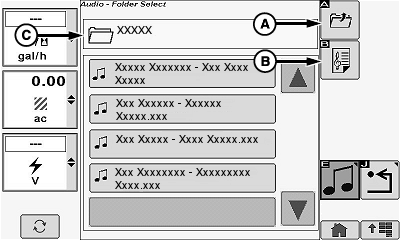
Folder Icon (A)
H105088-UN-27MAR12
Touch or press confirm switch when folder icon is highlighted.
Playlist Enable/Disable Icon (B)
Allows operator to enable/disable playlist mode (if available).
Touch or press confirm switch when playlist enable/disable icon is highlighted.
Folder Name (C)
Allows operator to view folder name (if folder was previously named).
|
OUO6075,000112F-19-20120503 |