Auxilary (AUX) Home Page

H105093-UN-28MAR12
Infotainment Icon / Audio Application Icon
H105352-UN-03MAY12
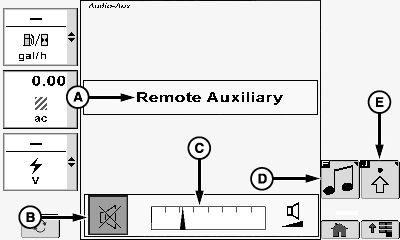
Remote Auxiliary (AUX) (A)
Indicates that an external device is connected to the stereo auxiliary port (3.5 mm) and is selected as the audio source (see Radio Source Select in this section for additional information).
Mute Icon (B)
Allows operator to mute radio sound level.
Touch or press confirm switch when mute icon is highlighted.
Volume Bar Graph Area (C)
Allows operator to adjust current sound level.
Touch plus (+) symbol or minus (-) symbol or rotate selection dial to increase or decrease bar graph settings.
Source Select Icon (D)
Allows operator the ability to cycle through radio tuner sources and external sources (see Radio Source Select in this section for additional information).
Touch or press confirm switch when select source icon is highlighted to cycle through available choices.
Audio Settings Icon (E)
Allows operator to change desired audio settings. Refer to Audio Settings later in this section for further information.
|
OUO6075,0001133-19-20120625 |