Check Header Height Sensors (S-Series Combines)
-
IMPORTANT:
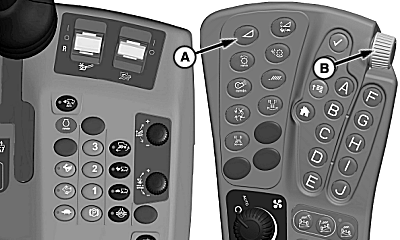
H100053-UN-03FEB11S Series Combines
A - Float Pressure Adjust Switch
B - Selection Dial
Platform must be attached to combine. Each sensor is checked separately.NOTE: Verify optional auxiliary header height sensors (if equipped) are secured in storage position. See Automatic Header Height Control — Rigid Mode in Operating The Platform section in Operators Manual.
Attach platform to combine (see combine Operators Manual for attachment information).
-
Increase platform float pressure to maximum:
-
Press float pressure adjust switch (A) on armrest.
-
Rotate selection dial (B) clockwise (+) to increase cutterbar pressure. Setting will be displayed on armrest display screen.
-
Completely lower header to ground.
-
-
Shut OFF engine and set parking brake.
-
IMPORTANT:
H95878-UN-29MAR10Main Menu Icon (Display) / Main Menu Switch (Armrest)

H95846-UN-31MAR10Message Center
Avoid machine movement, do NOT start engine for this procedure.
Application IconTurn key switch ON, but do not start machine.
-
Press main menu icon or switch.
-
Touch or press confirm switch when message center icon is highlighted.
-
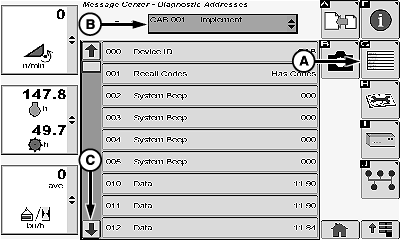
H101579-UN-17MAY11Reference Display Screen
A - Diagnostic Address Icon
B - Device Drop Down Menu
C - Scroll Down Arrow
Touch or press confirm switch when diagnostic address icon (A) is highlighted. -
Touch or press confirm switch when device drop down menu (B) is highlighted.
NOTE: Touch or press confirm switch when down arrow is highlighted to scroll through listing.
-
Touch or press confirm switch when LC1 controller is highlighted in menu listing.
-
Touch or press confirm switch when down arrow (C) is highlighted.
-
Touch or press confirm switch when proper sensor address (see table) is highlighted.
Sensor
Address Number
Left-Hand Header Height Sensor
Left-Hand Auxiliary Header Height Sensor (if equipped)
21
Center 1 Header Height Sensor
Center Auxiliary Header Height Sensor (if equipped)
22
Center 2 Header Height Sensor
23
Right-Hand Header Height Sensor
Right-Hand Auxiliary Header Height Sensor (if equipped)
24
-
NOTE:
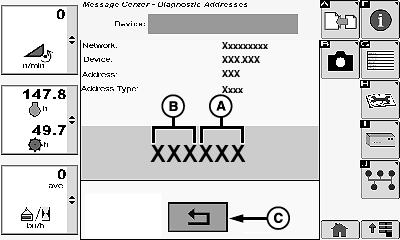
H107374-UN-01APR13A - Header Height Sensor Voltage Reading
B - Auxiliary Header Height Sensor Voltage Reading (If Equipped)
C - Return/Back Arrow Icon
Operating voltage range of sensors must fall between 051—449.Right most numbers (last three) are used to indicate header height sensor voltage.
Recommended voltage range of header height sensors should fall between 070—430.
Left most numbers (first three) are used to indicate the optional auxiliary header height sensor voltage.
Recommended voltage range of optional auxiliary header height sensors should fall between 060—440.
Sensor Voltage Readings:
-
Header height sensor voltage reading (A) with float system at upper limit should fall between optimal range of 070—130.
-
Optional auxiliary header height sensor voltage reading (B) with optional auxiliary header height sensors in storage position should fall between optimal range of 060—100.
NOTE: If no number is present or voltage readings do not fall between 051—449, then header height sensors on platform will not function properly and will need adjusted (See Adjusting Header Height Sensors section in this manual).
-
-
Touch or press confirm switch when return/back icon (C) is highlighted to return to previous screen.
-
Repeat sensor voltage adjustment for each address at maximum float pressure.
-
 CAUTION:
TS696-UN-21SEP89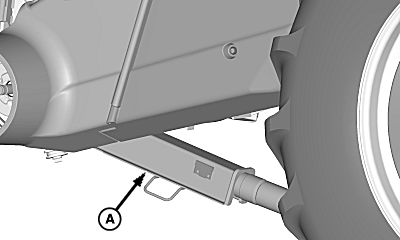
H90891-UN-26FEB08A - Feeder House Safety Stop
Death to you or others can result from feeder house inadvertently lowering. Completely raise feeder house and verify that safety stop is engaged when performing this procedure with header attached.NOTE: Verify optional auxiliary header height sensors (if equipped) are unpinned and fully lowered. See Automatic Header Height Control — Rigid Mode in Operating The Platform section in Operators Manual.
Completely raise feeder house and engage safety stop (A).
-
H100053-UN-03FEB11S Series Combines
A - Float Pressure Adjust Switch
B - Selection Dial
Decrease platform float pressure to minimum:-
Press float pressure adjust switch (A) on armrest.
-
Rotate selection dial (B) counter clockwise (-) to decrease cutterbar pressure. Setting will be displayed on armrest display screen.
-
-
Shut OFF engine and set parking brake.
-
Repeat steps 4—11 to check sensors at minimum platform float pressure.
-
NOTE:
H107374-UN-01APR13A - Header Height Sensor Voltage Reading
B - Auxiliary Header Height Sensor Voltage Reading (If Equipped)
C - Return/Back Arrow Icon
Operating voltage range of sensors must fall between 051—449.Right most numbers (last three) are used to indicate header height sensor voltage.
Recommended voltage range of header height sensors should fall between 070—430.
Left most numbers (first three) are used to indicate the optional auxiliary header height sensor voltage.
Recommended voltage range of optional auxiliary header height sensors should fall between 060—440.
Sensor Voltage Readings:
-
Header height sensor voltage reading (A) with float system at lower limit should fall between optimal range of 370—430.
-
Optional auxiliary header height sensor voltage reading (B) with optional auxiliary header height sensors fully lowered should fall between optimal range of 400—440.
NOTE: If no number is present or voltage readings do not fall between 051—449, then header height sensors on platform will not function properly and will need adjusted (See Adjusting Header Height Sensors section in this manual).
-
-
Touch or press confirm switch when return/back icon (C) is highlighted to return to previous screen.
-
Repeat sensor voltage adjustment for each address at minimum float pressure.
-
H95878-UN-29MAR10Main Menu Icon (Display) / Main Menu Switch (Armrest)
H95845-UN-31MAR10Combine Main
Press main menu icon or switch.
Application Icon -
Touch or press confirm switch when combine main page icon is highlighted.
-
Perform header calibration (See combine Operators Manual for calibration procedure).
|
DF67602,00001FA-19-20130912 |