Remove and Install Side Draper Belts 635FD, 640FD and 645FD
-
 CAUTION: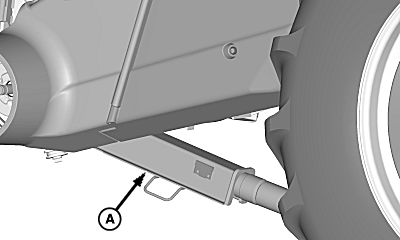
H90891-UN-26FEB08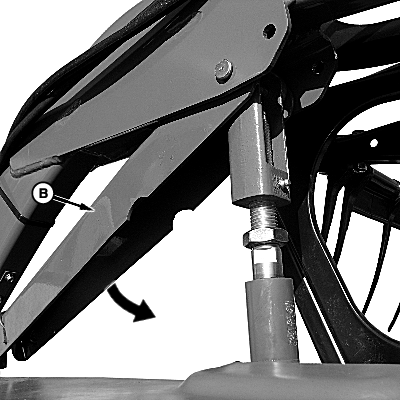
H112224-UN-12NOV14A - Feeder House Safety Stop
B - Reel Safety Stop
Death to you or others can occur from feeder house inadvertently lowering. Completely raise feeder house and verify that safety stop is engaged when performing any procedure with header attached to machine.Cracking of hydraulic line fittings to lower feeder house results in an immediate dropping of feeder house and header. To prevent injury, raise feeder house completely and lower safety stop (A) onto hydraulic cylinder rod.
NOTE: All four side draper belts are same length.
Decrease HydraFlex™ pressure to 0 kPa (0 bar) (0 psi).
-
Open side shield.
-
Completely raise platform and lower feeder house safety stop (A) onto hydraulic cylinder rod or lower header frame onto blocks.
-
Raise reel completely and engage reel safety stops (B) on reel lift cylinders.
-
Shut OFF engine, set park brake, and remove key.
-
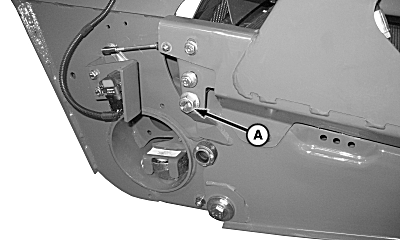
H93042-UN-31JUL09A - Tension Nut
Loosen tension nut (A) completely to remove tension on side draper belts. -
CAUTION:
H112467-UN-06JAN15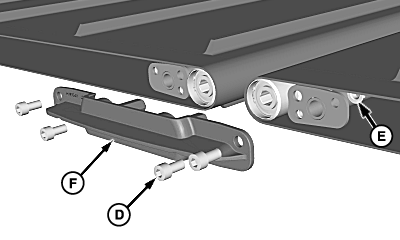
H112237-UN-13NOV14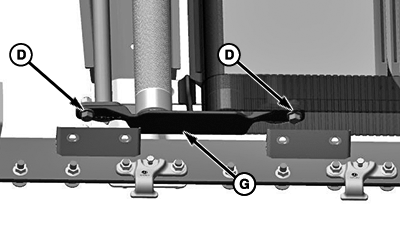
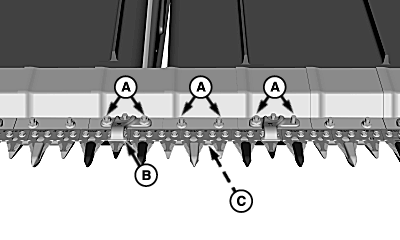
BM000736-UN-09JUN16A - Cap Screws and Nuts
B - Knife Hold-Down
C - Skid Shoe
D - Cap Screw
E - Nut
F - Dual Roller Bracket
G - Dual Roller Bracket
To avoid injury, do not let skid shoes fall when removing cap screws from cutterbar.IMPORTANT: Serious platform damage may result if knife hold-downs, skid shoes, and hardware are not installed in their original positions. Keep components organized during removal to ease in proper installation.
Remove cap screws and nuts (A) that fasten crop ramp plate in front of belt drive rollers. Retain any knife hold-downs (B) and skid shoes (C) that are removed.
-
Remove crop ramp plate.
-
Remove cap screws (D), nuts (E), and dual roller bracket (F).
-
If equipped with dual roller bracket (G): Release the cap screws (D) and remove the dual roller bracket (G).
-
IMPORTANT: Serious platform damage may result if knife hold-downs, skid shoes, and hardware are not installed in their original positions. Keep components organized during removal to ease in proper installation.
H112239-UN-13NOV14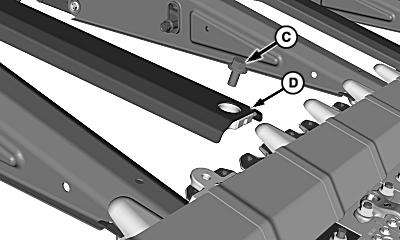
H95566-UN-03MAR10A - Float Arms
B - Draper Belt
C - Cap Screw
D - Intermediate Belt Support
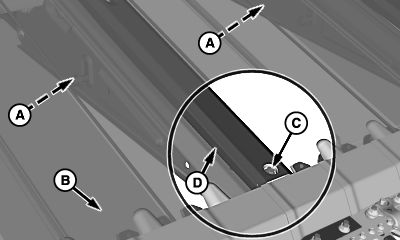
Above each float arm (A), lift draper belt (B) to access the intermediate belt support. -
Remove cap screw (C), lift front of support (D), and pull support out.
-
Repeat for remaining belt supports.
-
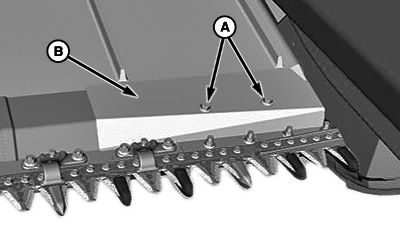
BM000470-UN-07OCT15A - Screw
B - Crop Ramp
If replacing OUTER draper belt:-
Remove cap screws and nuts (A), and crop ramp (B).
-
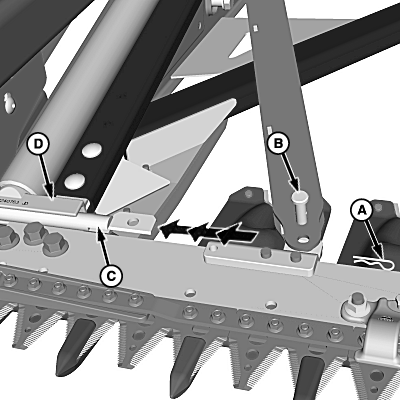
H96399-UN-17MAY10Belt and Shield Removed for Clarity
A - Spring Pin
B - Straight Pin
C - Roller Support Arm
D - Outside Roller Assembly
Remove spring pin (A) from bottom of straight pin (B), and remove straight pin. -
Slide roller support arm (C) toward outside of platform until it is clear of roller assembly (D), allowing front of roller assembly to be lifted above crop ramps.
-
Remove outer draper belt.
-
-
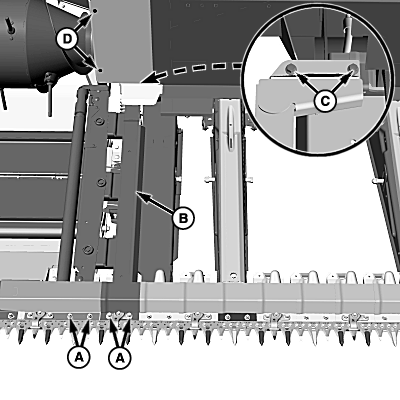
H109635-UN-14JAN14A - Cap Screws and Nuts
B - Inside Idler Roller Assembly
C - Cap Screws and Nuts
D - Hex Drive Cap Screws
If replacing INNER draper belt:-
IMPORTANT: Serious platform damage may result if knife hold-downs, skid shoes, and hardware are not installed in their original positions. Keep components organized during removal to ease in proper installation.
Remove cap screws and nuts (A) that fasten roller assembly (B) and crop ramps to cutterbar.
NOTE: Crop ramps are connected. Removal of more crop ramp cap screws may be necessary to release roller assembly.
-
Remove hex drive cap screws (D) and access panel.
-
Partially loosen cap screws (C) to allow front of roller assembly to be lifted above crop ramps.
-
Remove inner belt.
-
-
IMPORTANT:
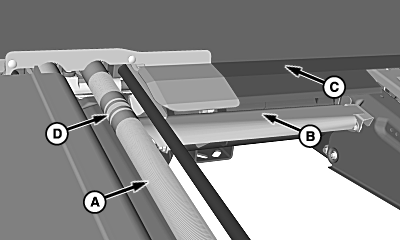
H96398-UN-17MAY10A - Drive Roller
B - Lower Belt Channel
C - Upper Belt Support
D - Guide Groove
Serious damage or failure of draper belt can occur if improperly installed. Verify that belt is positioned properly before and after tensioning.NOTE: Draper belt must be installed so rib on inside of belt is toward rear of platform.
Installing INNER or OUTER Belt:
Install draper belt around rollers (A).
-
Install lower loop of belt into channel (B) and upper loop above support (C).
-
Verify draper belt inner rib is seated into roller guide groove (D) on both the idler rollers and drive rollers.
-
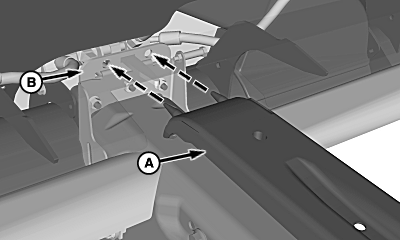
H106064-UN-31OCT12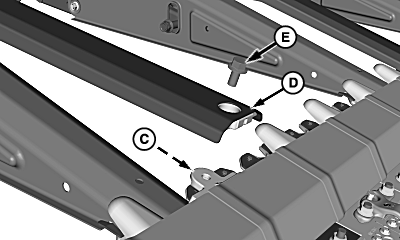
H106065-UN-31OCT12A - Intermediate Belt Support (Rear)
B - Support Bracket
C - Nut
D - Intermediate Belt Support (Front)
E - Cap Screw
Slide bottom loop of belt under all crop ramp saddles. -
Between loops of the draper belt, insert rear of intermediate belt support (A) into support bracket (B). Verify that the pins of the support are fully seated into the bracket.
-
NOTE: Verify that nut (C) is present before installing support.
Install front of support (D) using cap screw (E).
-
Slide upper loop of draper belt into space between crop ramps and saddles.
-
IMPORTANT: Serious platform damage may result if knife hold-downs, skid shoes, and hardware are not installed in their original positions.
Verify that idler roller crop ramp and drive roller crop ramps are installed at their original locations.
Attach roller assemblies to cutterbar in reverse order of removal.
-
Tighten all hardware, install access panels, and check knife hold-down clearances (see Knife Hold-Down Clearance in Adjustments—Feeding Related section).
-
IMPORTANT: Damage to belt and platform can occur if belt is not aligned on rollers and belt supports correctly.
During tensioning, verify rib on inside of belt is seated in groove on rollers and surfaces of belt are in their proper channels.
NOTE: Set HydraFlex™ pressure to setting above 17 237 kPa (172 bar)(2500 psi).
H93042-UN-31JUL09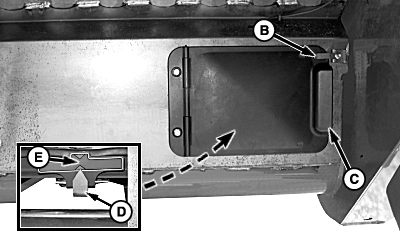
H102582-UN-01JUL11Viewed from Rear, Right-Hand Side
A - Tension Nut
B - Latch
C - Access Door
D - Tension Indicator
E - Tension Gauge
Tighten tension nut (A) to set belt tension.IMPORTANT: Avoid severe belt damage. Do NOT operate platform with tension indicator outside of green area of gauge.
NOTE: Tension gauge is viewed from rear of platform, behind door.
-
To view tension gauge, release latch (B) and open door (C).
-
Clean all crop residue, debris, and material from area around tension gauge.
-
Use tension indicator (D) to visualize the applied belt tension. Indicator must be positioned at center of tension gauge green area.
-
Repeat the tension adjustment in the other side of platform, if necessary.
-
Start engine which must be running at slow idle, engage separator and platform.
-
Set to HydraFlex™ work pressure.
-
Raise and lower to the ground the platform three times.
NOTE: Allow platform beat the ground when perform the raise and lower procedure.
-
Increase HydraFlex™ pressure until rigid mode is obtained.
-
Raise platform and set to HydraFlex™ work pressure.
-
Shut OFF engine, set parking brake and remove key.
-
Check tension belt. The Indicator must be positioned at center of tension gauge green area.
-
Close all doors and shields.
-
After 10 minutes working with the platform recheck the tensions belts.
|
HydraFlex is a trademark of Deere & Company |
DF67602,000062B-19-20160609 |