Reel Drive Gear Adjustment
-
NOTE: Split reel shown with right-hand reel removed for clarity. Single reel similar.
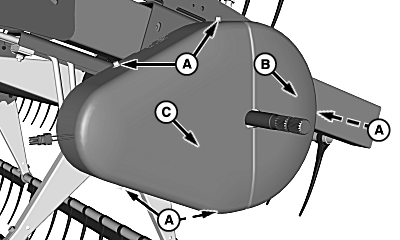
H93052-UN-17FEB10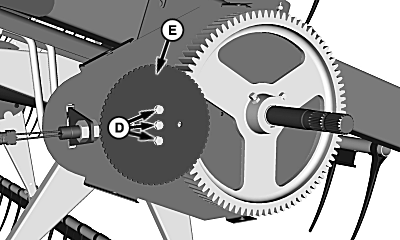
H93054-UN-17FEB10A - Cap Screws
B - Front Shield
C - Rear Shield
D - Cap Screws and Washers
E - Tone Wheel
Remove cap screws (A) and shields (B and C). -
Remove cap screws and washers (D), and tone wheel (E). Cap screw spacer behind tone wheel will come off during removal.
-
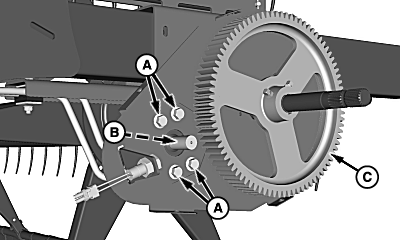
H93055-UN-17FEB10Drive Gear Removed for Clarity
A - Cap Screws
B - Drive Gear (Not Shown)
C - Driven Gear
Loosen motor mount cap screws (A). -
Slide motor and drive gear (B) over so drive gear rests firmly against larger, driven gear (C).
-
Slide motor and drive gear (B) back 1.5 mm (1/16 in.) and tighten cap screws (A) to specification.
Item Measurement Specification Motor Mount Cap Screws Torque 130 N˙m (96 lb-ft) -
Rotate reel to verify there are no tight spots between gears. If necessary, loosen cap screws (A), slightly slide motor and drive gear (B) back, and tighten cap screws to specification.
-
Install spacer and tone wheel using previously removed hardware.
-
Adjust speed ratio sensor (see REEL SPEED RATIO SENSOR ADJUSTMENT in this section).
-
Install shields using previously removed cap screws.
|
KR43067,00001A9-19-20100503 |