Adjusting Feeder House Drop Rate and Sensitivity — S and 70 Series Combines
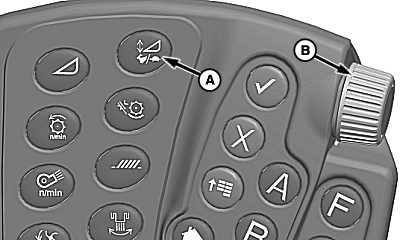
H99167-UN-23NOV10
S Series Shown
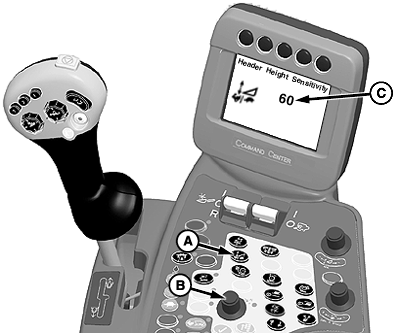
H87056-UN-30JUL07
70 Series Shown
A - Feeder House Rate/Sensitivity Adjust Switch
B - Selection Dial
C - Sensitivity Settings
Height Sensing and Active Header Float Pressure Sensitivity (Automatic Functions): Controls the response rate for header movements when operating in automatic sensing and automatic float modes.Changing rate for automatic functions:
- Verify road transport disconnect switch is in field mode.
-
Press feeder house rate/sensitivity adjust switch (A) twice to adjust settings. Settings are adjusted
between 0 to 100.
NOTE: Sensitivity setting will be shown on armrest display (C)
when adjusting.
- Turn selection dial (B) clockwise to increase response rate or counterclockwise to decrease response rate.
H99167-UN-23NOV10
S Series Shown
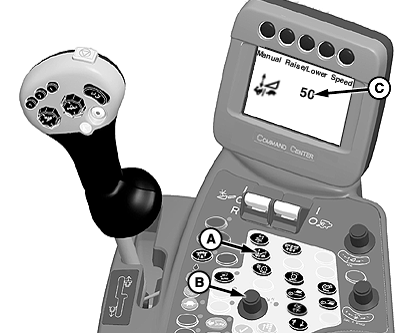
H87057-UN-30JUL07
70 Series Shown
A - Feeder House Rate/Sensitivity Adjust Switch
B - Selection Dial
C - Rate Settings
Manual Raise/Lower Speed (Manual Functions): Controls the response rate of header raise/lower functions during manual control and during automatic height resume mode.Changing rate for manual functions:
- Verify road transport disconnect switch is in field mode.
-
Press feeder house rate/sensitivity adjust switch (A) once to adjust settings. Settings are adjusted
between 0 to 100.
NOTE: Sensitivity setting will be shown on armrest display (C)
when adjusting.
- Turn selection dial (B) clockwise to increase response rate or counterclockwise to decrease response rate.
|
KR43067,00007BA-19-20110209 |