Active Header Control Display—Features
NOTE:
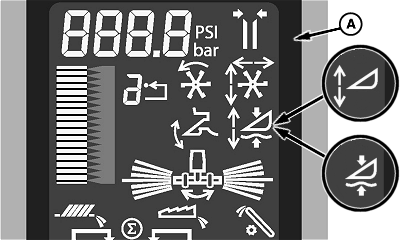
H100107-UN-08FEB11
S Series Corner Display
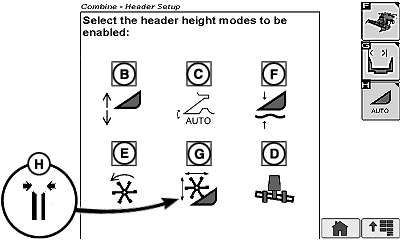
H100108-UN-08FEB11
S Series Buttons
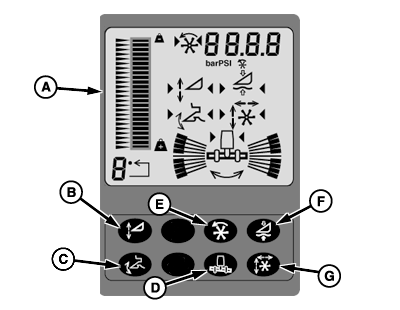
H86001-UN-13DEC06
70 Series Corner Display and Buttons
For complete information on each function refer to your combine Operators Manual.Active Header Control Display (A): Allows operator to recognize which function is currently active by highlighting appropriate icon on display.
NOTE: Control button locations may be different depending on combine model and installed equipment.
IMPORTANT: Performing any header calibration may automatically enable all six header modes discussed below.
Header Height Sensing Button (B): Allows operator to select the position of header relative to the ground and maintain that position automatically.
Header Height Sensing Button — HydraFlex™/HydraFloat (B): Allows operator to adjust the cutterbar ground pressure, or weight of the cutterbar, and return to that setting automatically. HydraFlex™/HydraFloat works in conjunction with header height sensing to maintain a header position relative to the ground, follow the ground contour, and return to that position automatically.
Header Height Resume Button (C): Allows operator to select the position of feeder house relative to the machine and return to that position automatically.
Lateral Tilt Button (D): Allows operator to maintain header position relative to the ground. Sensors are used to determine the height at each end of the header. Header is tilted at feeder house to equalize distance to the ground at each end. If equipped with Header Height Sensing—HydraFlex™ (optional), the two systems work together to maintain the closest position of cutterbar relative to the ground.
Dial-A-Speed Button (E): Allows operator to select an automatic operating speed for reel or belt pickup belts. Operating speed is a ratio of machine ground speed to reel/belt speed.
Feeder House Float Button (F): Allows a rigid header to be operated in contact with the ground and maintain a set contact pressure. Operator selects how firmly the header contacts ground and returns to that pressure automatically.
NOTE: Feeder House Float mode is not recommended with HydraFlex™ auger or 600 series draper platforms, as excessive wear of the poly skid shoes may occur.
Reel Position Resume Button (G): Allows operator to select the height and fore/aft position of reel and return to that position automatically.
Deck Plate Position Resume (H): Allows operator to select the opening width of the adjustable deck plates (if equipped) and return to that position automatically.
|
HydraFlex is a trademark of Deere & Company |
SS43267,000040C-19-20140701 |