Calibrate Solution Pump
The SprayStar system will automatically calibrate itself in order to provide an optimal control for a particular situation.
The only time calibration is needed is when the A and B values (represented by the digits following the A and B letters on display) do not lie within their ranges or when one of the following has been replaced:
- Solution pump/hydraulic motor assembly
- Proportional valve
- Hydraulic pump
- SRC
NOTE: The A and B ranges are:
High Flow
|
A = 2000-4000 |
350 - 850 |
|
B = 6000-8000 |
1300 - 1800 |
NOTE: If minimum B range value is not attained maximum solution pump output is not available. See Troubleshooting section in this manual.
Standard Flow
|
A = 2000-4000 |
350 - 850 |
|
B = 6500-9000 |
1400 - 2000 |
To auto calibrate the sprayer:
NOTE: Solution pump switch should be turned off to perform this procedure.
Hydraulic oil should be warm during the pump calibration procedure.
-
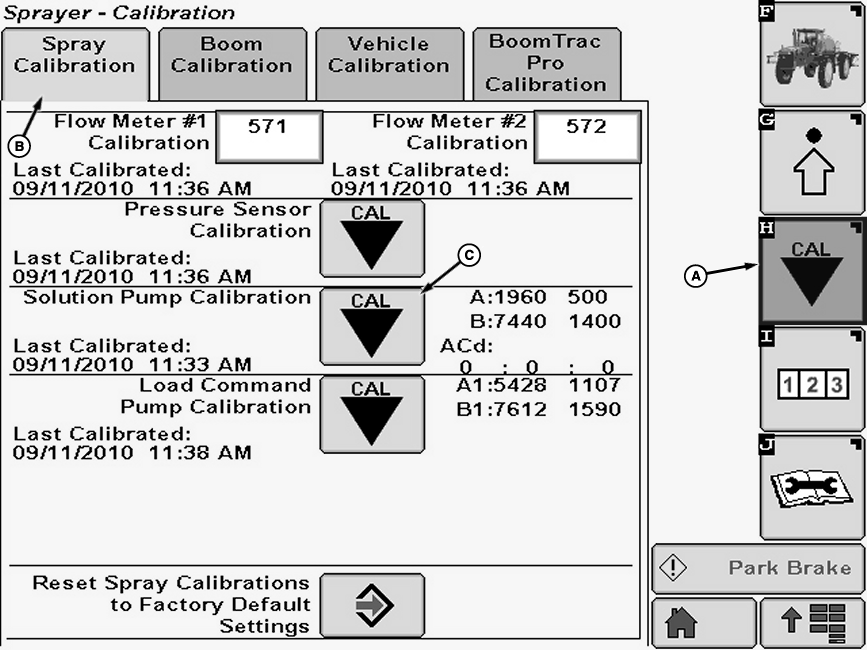
N89545-UN-23SEP10A - Calibration Softkey
B - Spray Calibration Tab
C - Calibration Icon
Operate engine at full throttle and warm hydraulic fluid temperature to normal operating range of 60-88° C (140 -190° F). -
Fill solution tank with enough water or solution to keep pump from running dry.
-
Select the Calibration softkey (A) to view the setup menu.
-
Select the Spray Calibration tab (B).
-
Select calibration icon (C) next to Pump Calibration. Pump Calibration will appear.
-
NOTE: Warm hydraulic fluid temperature to normal operating range before calibration and fill solution tank with enough water or solution to keep pump from running dry.
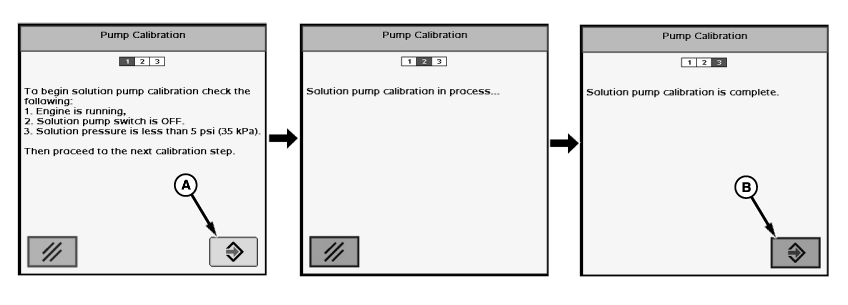
N74766-UN-18JAN07A - Enter Button
B - Enter Button
Follow instructions on first screen. When finished select “Enter” button (A) to proceed to next screen. -
NOTE: Pump calibration will take approximately 1-2 minutes. The solution pump will turn off when auto calibration is done.
“Solution pump calibration is complete.” will be displayed. Press “Enter” button (B) to return to Spray Calibration tab.
|
OUO6092,0000439-19-20100922 |