Boom Folding—27.4, 30.5, and 36.6 m (90, 100 and 120 ft.) Booms
Select Boom Fold Mode
-
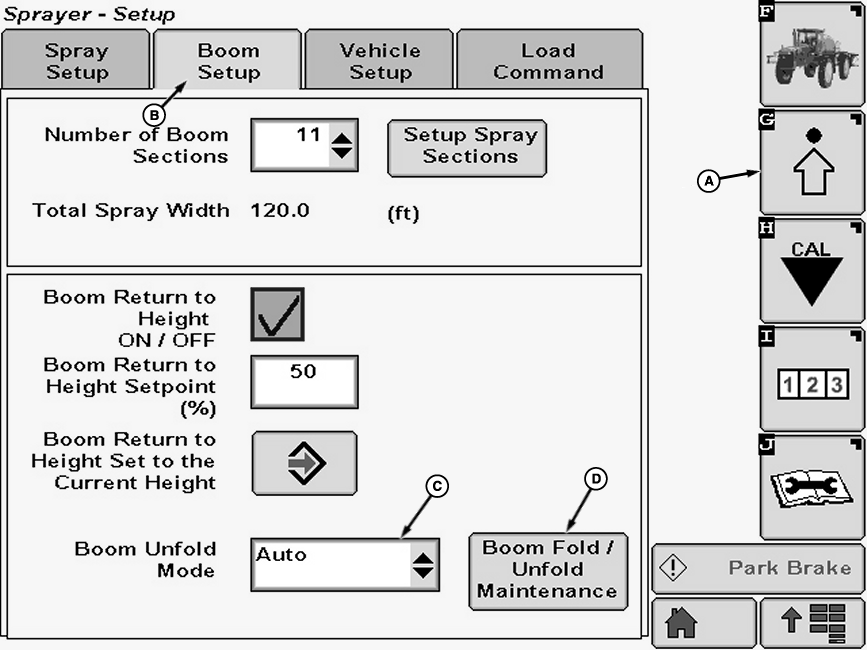
N89532-UN-23SEP10A - Setup Softkey
B - Boom Setup Tab
C - Drop-down Box
D - Maintenance Button
Select the Setup softkey (A). -
Select the Boom Setup tab (B).
-
Select drop-down box (C) next to Boom Unfold Mode and select between:
AUTO
MANUAL
NOTE: In AUTO mode boom can be folded and unfolded its entire length by using floor switch and one switch on multifunction control handle. Manual mode requires use of more switches, and unfolds and folds by section.
-
If maintenance mode is desired, press Boom Fold \ Unfold Maintenance button (D) (See Maintenance Mode in this section for details.)
Full Boom Auto Unfold/Fold—27.4, 30.5 and 36.6 m (90, 100 and 120 ft.) Boom
-
 CAUTION: Avoid injury or death to others. Make sure no one is
close to boom when unfolding outer sections.
CAUTION: Avoid injury or death to others. Make sure no one is
close to boom when unfolding outer sections.NOTE: Machine must be traveling less than 8 km/h (5 mph) to unfold or fold boom.
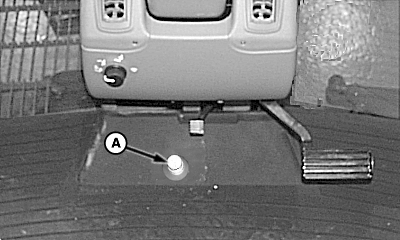
N64726-UN-10DEC03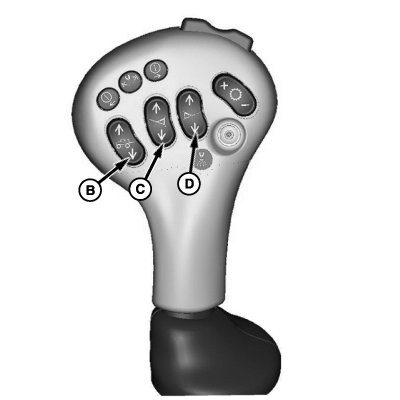
N64724-UN-09JAN04A - Floor Switch
B - Center Boom Lower Switch
C - Left Boom Lower Switch
D - Right Boom Lower Switch
To Unfold; press and hold floor switch (A). -
Press and hold center boom lower switch (B). All boom sections on both sides will now unfold completely. Once booms have completely unfolded, release switches.
-
Press center boom lower switch (B) until boom is lowered to desired height. Release switch.
-
Press left boom lower switch (C) to lower left boom to desired height. Press right boom lower switch (D) to lower right boom to desired height.
-
CAUTION: Avoid injury or death to others. Make sure no one is
standing near boom when folding to transport position.
N64726-UN-10DEC03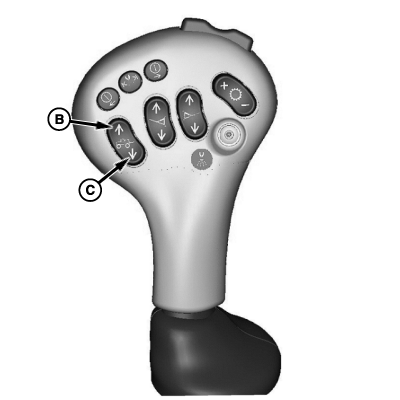
N64727-UN-10DEC03A - Floor Switch
B - Center Boom Raise Switch
C - Center Boom lower switch
To Fold; press and hold floor switch (A). -
Press and hold center boom raise switch (B). Booms will now raise completely and fold in towards the machine. Once booms are completely folded and in against the machine, release switches (A ,B).
-
Press center boom lower switch (C) until booms are completely lowered into cradle.
IMPORTANT: Hold center boom lower switch for 5 seconds to insure rear of inner boom has contacted and supported by the rear boom support.
Full Boom Manual Unfold/Fold—27.4, 30.5 and 36.6 m (90, 100 and 120 ft.) Boom
-
CAUTION: Avoid injury or death to others. Make sure no one is
close to boom when unfolding outer sections.
NOTE: Machine must be traveling less than 8 km/h (5 mph) to unfold or fold boom.
Corresponding boom sections on either side will unfold sequentially, stopping after each section is unfolded. The operator must release the unfold button and re-actuate to continue the unfold procedure.
The 27.4 and 30.5 m (90 and 100 ft.) booms are designed so that only one boom can be unfolded/folded if desired. (See Unfolding/Folding One Boom in this section.)
The 36.6 m (120 ft.) boom is not designed to have only one boom unfolded at a time. Only breakaway/outer sections of this boom can be unfolded/folded individually.
N64850-UN-22JAN04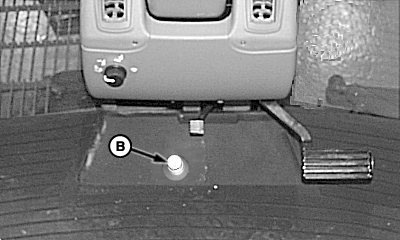
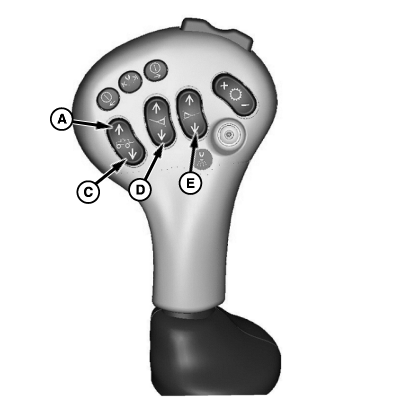
N64725-UN-10DEC03A - Center Boom Raise Switch
B - Floor Switch
C - Center Boom Lower Switch
D - Left Boom Lower Switch
E - Right Boom Lower Switch
To Unfold; Press center boom raise switch (A) to raise boom to highest position. -
Press & hold floor switch (B) & center boom lower switch (C) until inner wings are unfolded.
-
Release switch (C) and press again until middle sections are unfolded.
-
Release switch (C) and press again until outer/breakaway sections are unfolded. Release switches (B and C).
-
Press switch (C) to position nozzles at desired height.
-
Press left boom lower switch (D) to lower left boom to desired height. Press right boom lower switch (E) to lower right boom to desired height.
-
CAUTION: Avoid injury or death to others. Make sure no one is
standing near boom when folding to transport position.
N64726-UN-10DEC03
N64727-UN-10DEC03A - Floor Switch
B - Center Boom Raise Switch
C - Center Boom lower switch
To Fold; press and hold floor switch (A). -
Press and hold center boom raise switch (B). Booms will now raise completely and fold in towards the machine. Once booms are completely folded and in against the machine, release switches.
-
Press center boom lower switch (C) until booms are completely lowered into cradle.
IMPORTANT: Hold center boom lower switch for 5 seconds to insure rear of inner boom has contacted and supported by the rear boom support.
Unfolding One Side
CAUTION: Avoid injury or death to others. Make sure no one is
close to boom when unfolding outer sections.
NOTE: The 27.4 and 30.5 m (90 and 100 ft.) booms are designed so that one boom can be folded in while spraying if desired.
The 36.6 m (120 ft.) boom is not. Only breakaway/outer sections of this boom can be unfolded/folded individually.
Since this procedure is different for the three boom lengths covered in this section, they will be described individually.
-
-
N64726-UN-10DEC03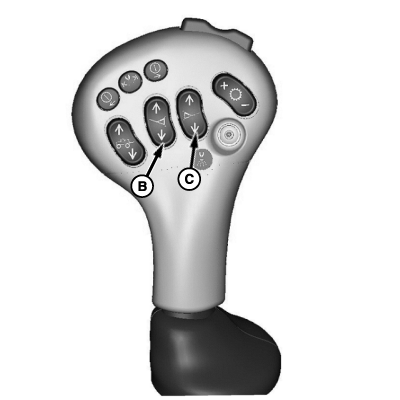
N64731-UN-10DEC03A - Floor Switch
B - Left Boom Lower Switch
C - Right Boom Lower Switch
Unfolding One Side—36.6 m (120 ft.) Boom: Unfold inner and middle boom sections as described in Full Boom Manual Unfold/Fold—27.4, 30.5 and 36.6 m (90, 100 and 120 ft.) Boom. -
Push and hold floor switch (A) and switch (B or C) until corresponding breakaway/outer boom section is unfolded. Release switches.
-
-
-
N64732-UN-10DEC03
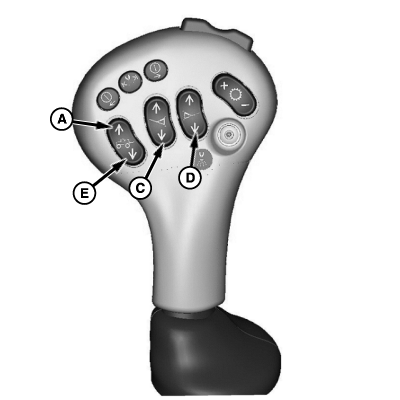
N64725-UN-10DEC03A - Center Boom Raise Switch
B - Floor Switch
C - Left Boom Lower Switch
D - Right Boom Lower switch
E - Center Boom Lower Switch
Unfolding One Side—30.5 m (100 ft.) Boom: Press center boom raise switch (A) to raise boom to highest position. -
Push and hold floor switch (B) and switch (C or D) until inner section of corresponding boom is unfolded.
-
Release switch (C or D) and press again until middle section is unfolded.
-
NOTE: Both sides may be unfolded simultaneously by pressing both switches (C and D) simultaneously if desired.
Release switch (C or D) and press again until breakaway section is unfolded.
-
Release floor switch.
-
Press center boom lower switch (E) to lower nozzles to desired height.
-
Press switch (C or D) to lower corresponding wing to desired level.
-
-
-
N64732-UN-10DEC03
N64725-UN-10DEC03A - Center Boom Raise Switch
B - Floor Switch
C - Left Boom Lower Switch
D - Right Boom Lower switch
E - Center Boom Lower Switch
Unfolding One Side—27.4 m (90 ft.) Boom: Press center boom raise switch (A) to raise boom to highest position. -
Push and hold floor switch (B) and switch (C or D) until inner section of corresponding boom is unfolded.
-
Release switch (C or D) and press again until outer/breakaway section is unfolded.
NOTE: Both sides may be unfolded simultaneously by pressing both switches (C and D) simultaneously if desired.
-
Release floor switch.
-
Press center boom lower switch (E) to lower nozzles to desired height.
-
Press switch (C or D) to lower corresponding wing to desired level.
-
Folding One Side
CAUTION: Avoid injury or death to others. Make sure no one is
standing near boom when folding to transport position.
NOTE: The 27.4 and 30.5 m (90 and 100 ft.) booms are designed so that one boom can be folded in while spraying if desired.
The 36.6 m (120 ft.) boom is not. Only breakaway/outer sections of this boom can be unfolded/folded individually.
Since this procedure is different for the three boom lengths covered in this section, they will be described individually.
-
-
N64726-UN-10DEC03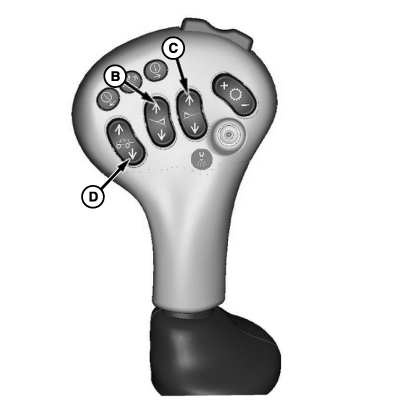
N64733-UN-10DEC03A - Floor Switch
B - Left Boom Raise Switch
C - Right Boom Raise Switch
Folding One Side—36.6 m (120 ft.) Boom: Unfold inner and middle boom sections as described in Full Boom Manual Unfold/Fold—27.4, 30.5 and 36.6 m (90, 100 and 120 ft.) Boom. -
Push and hold floor switch (A) and switch (B or C) until corresponding breakaway/outer boom section is folded. Release switches.
-
-
-
N64726-UN-10DEC03
N64733-UN-10DEC03A - Floor Switch
B - Left Boom Raise Switch
C - Right Boom Raise Switch
D - Center Boom Lower Switch
Folding One Side—30.5 m (100 ft.) Boom: Push and hold floor switch (A) and switch (B or C) until breakaway/outer wing on corresponding side is folded. -
Release switch (B or C) and press again until middle section is folded.
-
Release switch (B or C) and press again until inner section is folded. Center section will raise as inner section folds.
NOTE: Both sides may be folded simultaneously by pressing both switches (C and D) simultaneously if desired.
-
Release switches.
-
Press center boom lower switch (D) to lower boom into cradle.
IMPORTANT: Hold center boom lower switch for 5 seconds to insure rear of inner boom has contacted and supported by the rear boom support.
-
-
-
N64726-UN-10DEC03
N64733-UN-10DEC03A - Floor Switch
B - Left Boom Raise Switch
C - Right Boom Raise Switch
D - Center Boom Lower Switch
Folding One Side—27.4 m (90 ft.) Boom: Push and hold floor switch (A) and switch (B or C) until breakaway/outer wing on corresponding side is folded. -
Release switch (B or C) and press again until inner section is folded. Center section will raise as inner section folds.
NOTE: Both sides may be folded simultaneously by pressing both switches (C and D) simultaneously if desired.
-
Release switches.
-
Press center boom lower switch (D) to lower boom into cradle.
IMPORTANT: Hold center boom lower switch for 5 seconds to insure rear of inner boom has contacted and supported by the rear boom support.
-
Maintenance Mode
Maintenance mode is provided to allow the operator to unfold or fold each section individually for the service or repair of the boom.
-
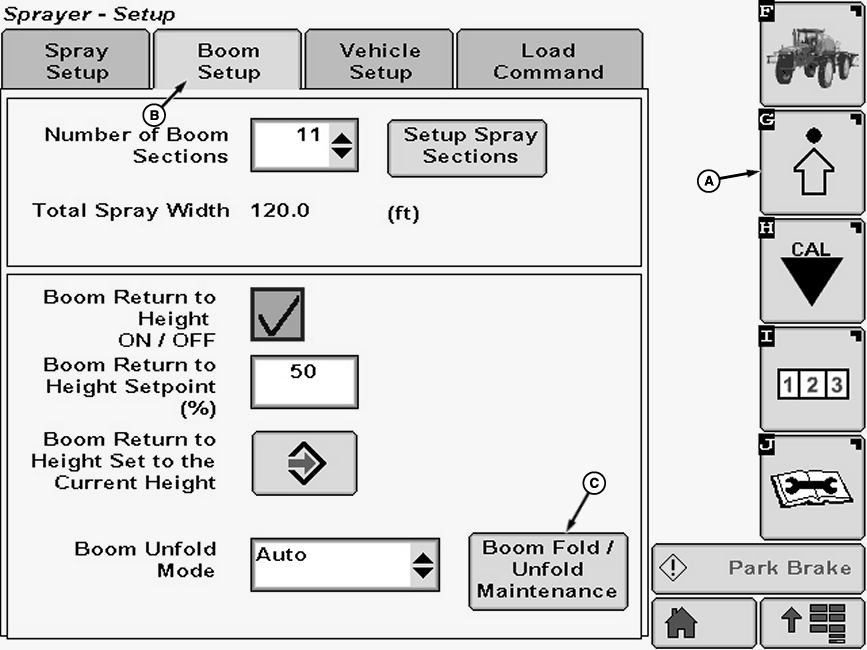
N89592-UN-28OCT10A - Setup Softkey
B - Boom Setup Tab
C - Boom Fold/Unfold Maintenance Button
Select the Setup softkey (A). -
Select the Boom Setup tab (B).
-
If maintenance mode is desired, select the Boom Fold / Unfold Maintenance button (C).
-
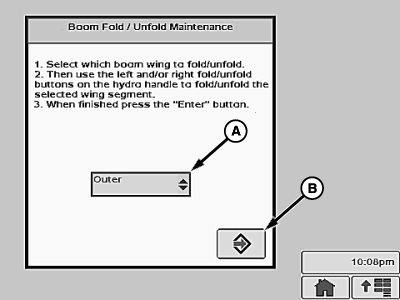
N77073-UN-25JUL07A - Drop-down Menu
B - Enter Button
Select boom section to fold/ unfold from drop-down menu (A) and follow directions on screen. The Tilt buttons on the multifunction control handle will control only the selected boom fold section selected while in Maintenance. Press Enter button (B) when finished.
|
OUO6092,0000579-19-20110407 |