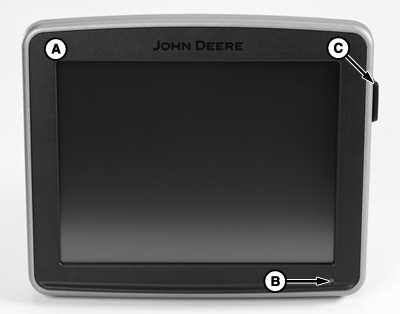
Front of Display
PC12701-UN-20JUL10
A - Display
B - LED (Power Light)
C - USB Port
LED (B) indicates power mode of display:
Cold boot progress bar is black with a yellow background.
Cold boot-up occurs when the GS3 display has been powered down for over 6 hours or loses unswitched power. It takes 60—80 seconds to power up.
Warm boot progress bar is yellow with a black background.
Warm boot-up occurs when the GS3 display has been operating in the last 6 hours and has NOT lost unswitched power during that time. It takes 20—30 seconds to power up.
Shutting Down or Standby mode LED is orange.
IMPORTANT: If LED is FLASHING ORANGE and the screen is blank, an out of range temperature condition is detected. Turn unit off to prevent damage to the display.
|
Operating Temperature Range |
|
-20° to 70° C (-4° to 158° F) |
|
Storage Temperature |
|
-40° to 85° C (-40° to 185° F) |
Status of the LED is green when display is on, orange when display is starting up and shutting down. If the LED is RED, the unit is not operational. Turn unit off. The display has encountered an error or issue and is working to recover.
IMPORTANT: Always clean screen display with power off. Cleaning screen while operating could result in unintended button selections.
To clean display, power down and wipe screen with a soft cloth sprayed with a non-ammonia based cleaner such as John Deere glass or multipurpose cleaner.
USB port used to transfer data to and from display and also updating software. Most USB drives will work with the display.
NOTE: The display has two USB ports for redundancy in case one was to fail. Only one USB storage device may be inserted at a time. The USB ports are meant for data transfer and reprogramming only.
|
CS12167,0000188-19-20120611 |