Select Desired Input Field with Display Control—Optional
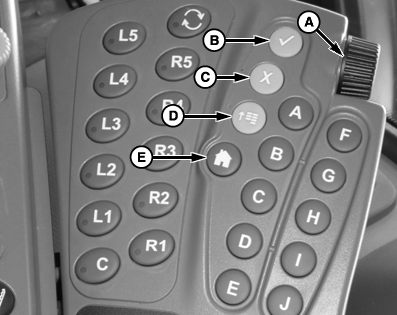
N102011-UN-11FEB13
Display Control
 CAUTION: Do not mount display control on the side of dual displays
(2630 and Original GreenStar Display). This blocks the operator’s
view and overloads the bracket. Mount the display control elsewhere.
CAUTION: Do not mount display control on the side of dual displays
(2630 and Original GreenStar Display). This blocks the operator’s
view and overloads the bracket. Mount the display control elsewhere.
NOTE: The 2630 GreenStar Display's primary navigational point is the touchscreen which allows the operator to input information by touching the screen.
THUMB WHEEL (A)— move highlight or focus.
ENTER (B)—allows operator to select input fields, buttons, or softkeys.
CANCEL (C)—cancels operator's selection or exits from selection process.
MENU (D)—displays menu list.
HOME (E)—returns user to sprayer main page.
Short-Cut Buttons A-J—allow operator to activate an associated input field, button, or softkey with the letter corresponding to the short-cut button pressed.
NOTE: Only input fields or softkeys will show a Highlight/focus around it.
To activate and select an input field, move highlight/focus with thumb wheel to desired function and press ENTER button (B).
|
CS12167,000018B-19-20130611 |