Operate Wheel Slip Control—If Equipped
N97496-UN-26SEP12
N97497-UN-22MAY13
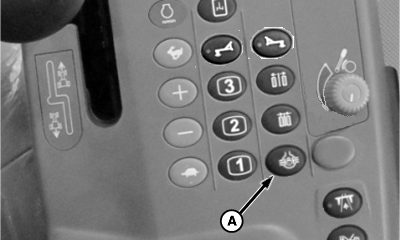
A - Wheel Slip Control Switch
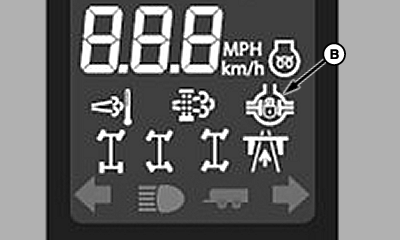
B - Wheel Slip Control Icon
Wheel slip control system is designed to provide additional tractive effort when needed. When engaged, the system provides additional tractive effort to the non-spinning wheels when one or more wheels spin out. The wheel slip control system aids in avoiding the machine being mired; it does not keep wheels from “spinning out” when mired.
-
Start machine.
NOTE: Wheel slip control can be operated in field range. When wheel slip control is engaged, shifting to transport range will automatically disengage wheel slip control.
-
Engage wheel slip control by pressing wheel slip control switch (A). The wheel slip control icon (B) will light on the corner post display when wheel slip control is engaged. Icon will begin flashing when the system is active.
NOTE: Wheel slip control can be engaged while machine is moving.
Wheel slip control can remain enabled at all times without over heating oil, the system is only active when wheel slip is sensed.
The status of the wheel slip control system is displayed on the primary display unit.
Wheel Slip Control System Status
|
System Status |
Corner Post Display Icon |
|---|---|
|
Disabled |
No Icon |
|
Ready |
Solid Icon |
|
Active |
Flashing Icon |
|
CS12167,0000236-19-20130617 |