Turn Rate Alarm On/Off
-
NOTE: The rate alarm tells the operator when the actual application rate deviates more than the selected percentage of the target application rate for 6 continuous seconds.
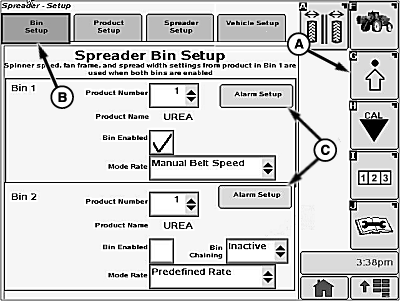
N86768-UN-27OCT09A - Setup Softkey
B - Bin Setup Tab
C - Alarm Setup Button
Select the Setup softkey (A) to view the setup menu. -
Select the Bin Setup tab (B).
-
Select Alarm Setup button (C) and Alarm Setup screen will appear.
-
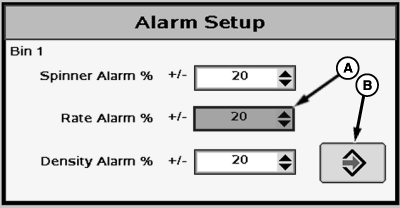
N80850-UN-12JUN08A - Drop-down Box
B - Enter Button
Select +/- 5, 10, 15, 20, 25 % deviation or “OFF” from drop-down box (A). -
Select Enter button (B) to save the alarm settings and return to Bin Setup screen.
|
CS12167,00002BB-19-20130102 |