Set Application Rates
Set Application Rates Through Product Setup Screen
-
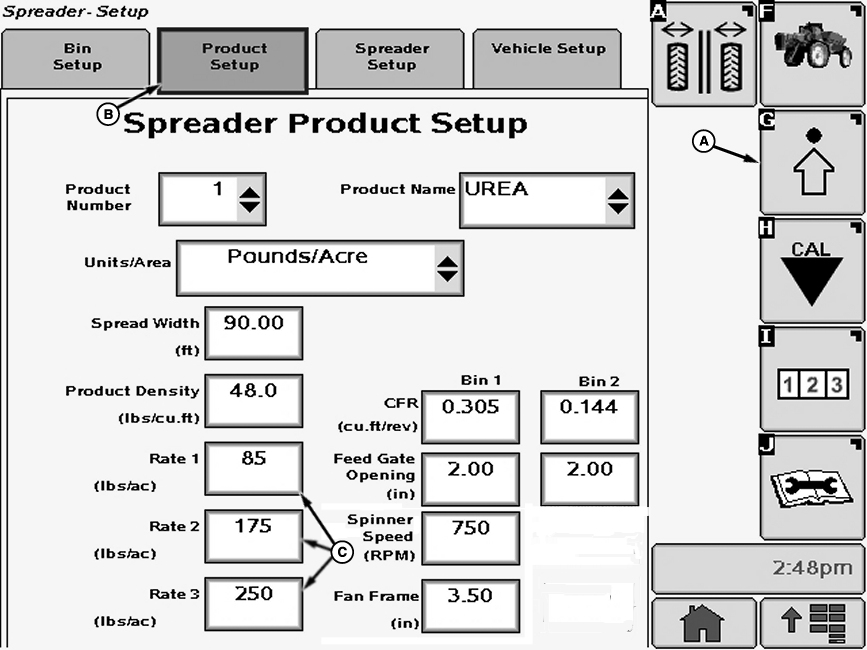
N82569-UN-08DEC08A - Setup Softkey
B - Product Setup Tab
C - Input Box
Select the Setup softkey (A). -
Select the Product Setup tab (B). Spreader Product Setup screen appears.
-
Select input boxes (C) to input the target application rates, in kg/ha or t/ha (lb/acre or tons/acre) into Spreadstar. A numeric key pad appears on screen to input new value. Press Enter button on keypad to accept the new value.
Set Application Rates Through Spreader Main Page
-
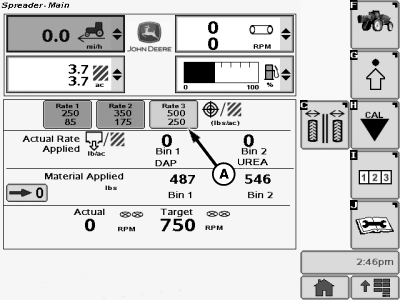
N91124-UN-16FEB11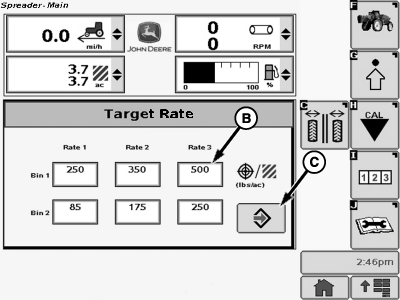
N91123-UN-16FEB11A - Button
B - Input Box
C - Enter Button
Select button (A) for the rate to be changed. Target Rate submenu appears. -
Select input box (B) for the rate which needs to be changed. A numeric key pad appears on screen to input new value. Press “Enter” button on keypad to exit keypad.
-
Press “Enter” button (C) to accept the new value.
|
CS12167,00002BD-19-20130513 |