Operate Boom Return to Height
-
N102020-UN-08APR13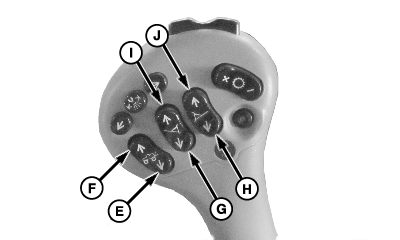
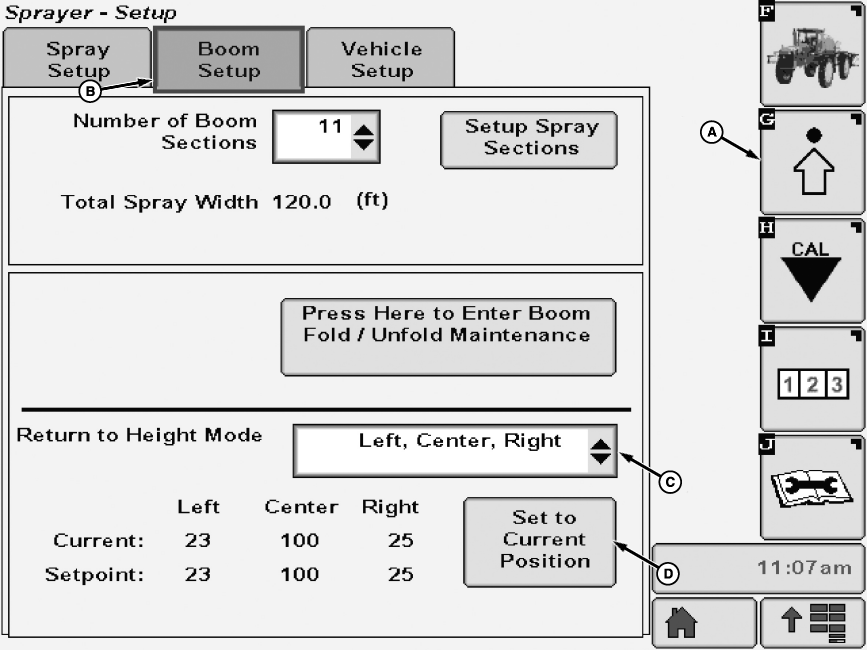
N102214-UN-05FEB13A - Setup Softkey
B - Boom Setup Tab
C - Drop Down Menu
D - Set to Current Position Button
E - Center Boom Lower Switch
F - Center Boom Raise Switch
G - Left-Hand Boom Lower (Unfold) Switch
H - Right-Hand Boom Lower (Unfold) Switch
I - Left-Hand Boom Raise (Fold) Switch
J - Right-Hand Boom Raise (Fold) Switch
Select the Setup softkey (A) to view the setup menu. -
Select the Boom Setup tab (B).
-
Select desired return to height mode from drop down menu (C). Operator may choose from modes of off, center, left and right, and left, center, right.
-
Move boom up or down and adjust boom wings to desired height.
-
Press set to current position button (D).
-
Start spraying operation.
-
Boom will respond as described in Return to Height mode operation table.
Return to Height Mode Operation
Mode
Return to Height Action
Multifunction Control Handle
Off
Return to Height function inactive.
Controls function normally with no stop points.
Center
Center frame stops at set height, wings retain full range of motion.
Press boom raise switch (F) to raise boom. Press and hold boom lower switch (E) to lower boom. Boom will stop at set height. Wings can be tilted to desired location using boom tilt switches (G, H, I, and J)
Left and Right
Center frame has no set stop point, wings stop at set tilt point.
Press left-hand and right-hand boom tilt up switches (I and J) to tilt boom wings up. Press and hold left-hand and right-hand boom tilt down switches (G and H) to tilt boom wings down to preset position. Center frame can be moved to desired position using boom raise and lower switches.
Left, Center, Right
Center frame and wings stop at set points
Press boom raise switch (F) to raise boom. Press and hold boom lower switch (E) to lower boom. Boom will stop at set height. Press left-hand and right-hand boom tilt up switches (I and J) to tilt boom wings up. Press and hold left-hand and right-hand boom tilt down switches (G and H) to tilt boom wings down to preset position.
NOTE: Boom automatically stops at set point. Boom can be lowered or tilted beyond set point by pressing (E, G or H) again.
"Boom Return to Height" will remain active while boom is folding or completely folded. When lowering boom onto boom cradle rests, boom may stop at set point if it is above the boom cradle rest height. Boom can be lowered or tilted beyond set point by pressing (E, G or H) again.
|
CS12167,00002E7-19-20130613 |