Calibrate Boom Level Position
-
NOTE: Setup of boom height sensor position, serial number, and placement on the boom should be done before any other changes or calibrations are performed. (See Setup BoomTrac Pro Sensors in this section for procedure.)
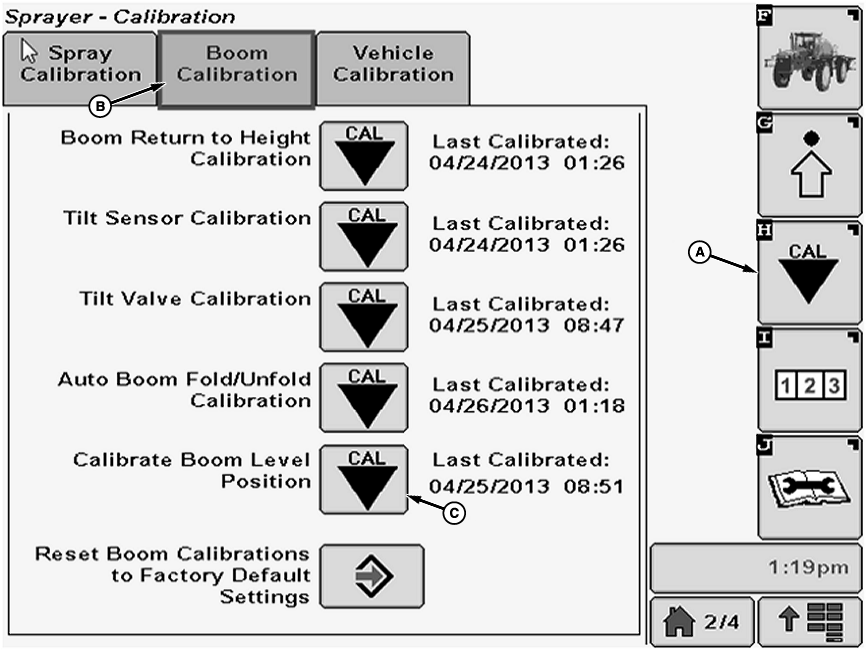
N103727-UN-09MAY13A - Calibration Softkey
B - Boom Calibration Tab
C - Calibration Icon
Select the Calibration softkey (A). -
Select the Boom Calibration tab (B).
-
Select calibration icon (C) next to Calibrate Boom Level Position. Calibrate Boom Level Position screen will appear.
-
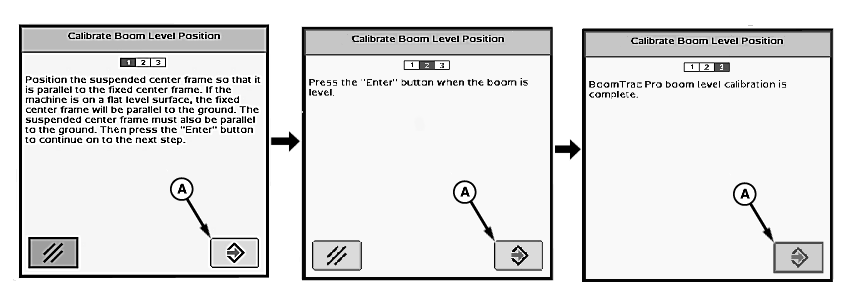
N77057-UN-25JUL07A - Enter Button
Follow instructions on first screen. When finished select “Enter” button (A) to proceed to next screen. -
“BoomTrac Pro boom level calibration is complete.” will be displayed.
|
CS12167,0000318-19-20130604 |