Download And Install Software Payload
IMPORTANT: Before attempting to install software payload, control unit and harness must be installed. Software Payload cannot be downloaded if control unit is not installed or harness is unplugged.
NOTE: Before downloading Software Payload, attachment specific software bundle is required for proper operation. Order N308217 through service parts. Machine model number and serial number is required at time of order. Download of updated software through Service Advisor's software delivery system is required.
Ensure latest version of CCU software from SDS is also downloaded prior to installing the DRC software download on the machine.
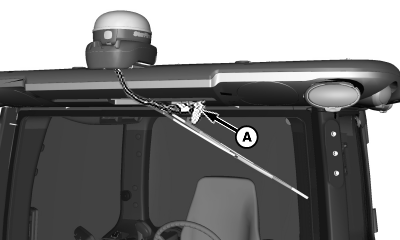
N102415-UN-01MAR13
A - Connector
-
Disconnect StarFire connector (A) from cab harness connector.
-
Disconnect GS3 2630 display.
-
Download Software Payload through Service Advisor.
-
Install software using John Deere Custom Performance™ software delivery system.
NOTE: Complete instructions on downloading and installing Software Payload are given in PC20380 DOWNLOAD SOFTWARE PAYLOAD Installation Instruction.
-
After Software Payload download and installation is complete, reconnect GS3 2630 display and reconnect StarFire connector (A) to cab harness connector.
|
Custom Performance is a trademark of Deere & Company |
CS12167,0000327-19-20130513 |