Setup Configurable Lights
Setup Flood Lights
-
NOTE:
N102633-UN-01MAR13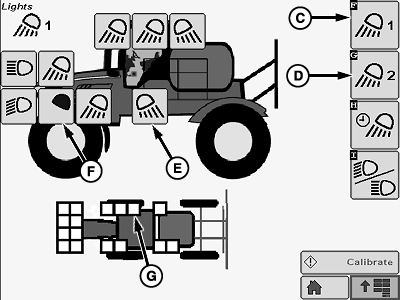
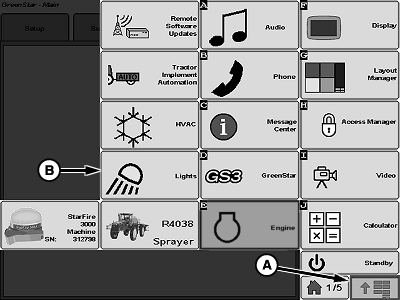
N102632-UN-01MAR13A - Menu Button
B - Lights Button
C - Flood Lights 1 Button
D - Flood Lights 2 Button
E - “Light On” Button
F - “Light Off” Button
G - Enabled Light
Lights default to all on until configured.Press menu button (A) to view application menu.
-
Press lights button (B).
-
Press flood lights 1 or flood lights 2 button (C or D).
-
Press “light on” buttons (E) to disable lights.
-
Press “light off” buttons (F) to enable lights
NOTE: Enabled lights (G) will be shown as white squares.
Setup Egress Lighting
-
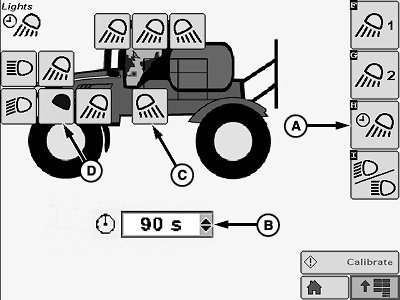
N102634-UN-01MAR13A - Egress Lighting Button
B - Drop Down Menu
C - “Light On” Button
D - “Light Off” Button
Press egress lighting button (A). -
Select desired time from drop down menu (B). Times range from 10 to 300 seconds in 30 second increments.
-
Select desired lights using “light on” and “light off” buttons (C and D).
|
CS12167,0000332-19-20130501 |