Load Station Keypad
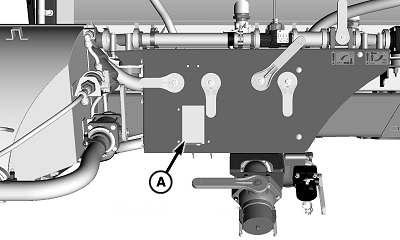
N103542-UN-30APR13
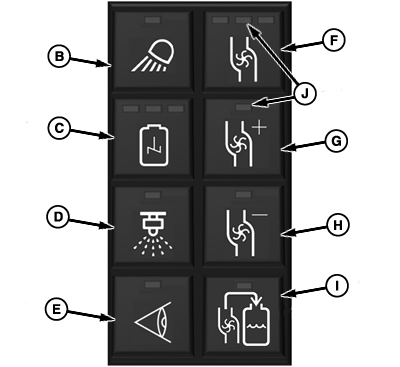
N103541-UN-30APR13
A - Cover
B - Load Station Light Button
C - Agitation Button
D - Spray ON/OFF Button
E - Nozzle Check Button
F - Solution Pump ON/OFF Button
G - Pump Speed Increase Button
H - Pump Speed Decrease Button
I - Pull-on Fill Button
J - Indicator
Lift cover (A) to access load station keypad.Keypad button functions are as follows:
- Load Station Light Button (B)—turns load station light ON/OFF
- Agitation Button (C)—turns agitation ON/OFF (Agitation volume must be set from GS3 display in cab)
-
Spray ON/OFF Button (D)—turns enabled spray sections ON/OFF
NOTE: Boom must be unfolded before Spray ON/OFF button is enabled.
Spray sections must be enabled or disabled using switches on CommandARM
Side Console.
- Nozzle Check Button (E)—allows operator to perform nozzle check (See Perform Nozzle Check in this section)
- Solution Pump ON/OFF Button (F)—turns solution pump ON/OFF (Solution pump runs at 50 percent speed until adjusted)
- Pump Speed Increase Button (G)—increases pump speed at set intervals per button push until maximum pump speed is achieved.
- Pump Speed Decrease Button (H)—decreases pump speed at set intervals per button push until minimum pump speed is achieved
- Pull-on Fill Button (I)—pressing button begins fill process, press button again to stop fill process (Valves must be properly set by operator before beginning fill)
Indicators (J) display the status (ON/OFF) of the function controlled by that button. Indicator light ON indicates the function is ON. Indicators can also display at what setting the function is operating.
|
CS12167,0000364-19-20130614 |