Setup Target Fill—If Equipped
-
N101907-UN-08MAY13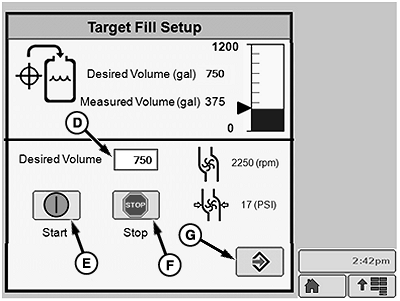
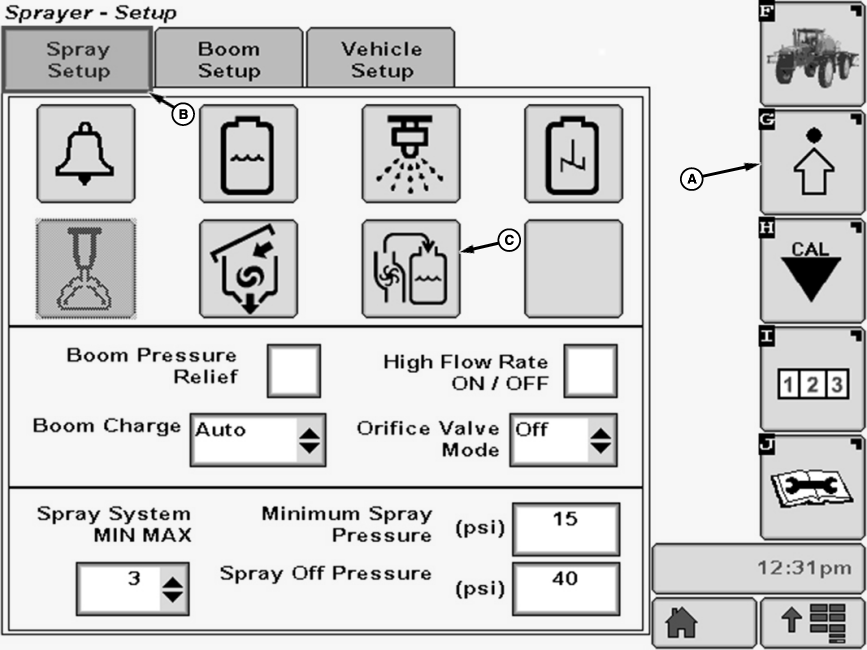
N103605-UN-09MAY13A - Setup Softkey
B - Spray Setup Tab
C - Target Fill Button
D - Input Box
E - Start Button
F - Stop Button
G - Enter Button
Select the Setup softkey (A) to view the setup menu. -
Select the Spray Setup tab (B).
-
Select Target Fill button (C).
-
Select input box (D).
-
Enter desired fill volume using pop-up keypad.
-
Press Start button (E) to begin fill procedure. Fill procedure will automatically end when fill volume entered is reached.
NOTE: To end fill at any time press Stop button (F).
-
Press Enter button (G) to return to Spray Setup after fill is complete.
|
CS12167,000036B-19-20130503 |