Spreader Product Setup
-
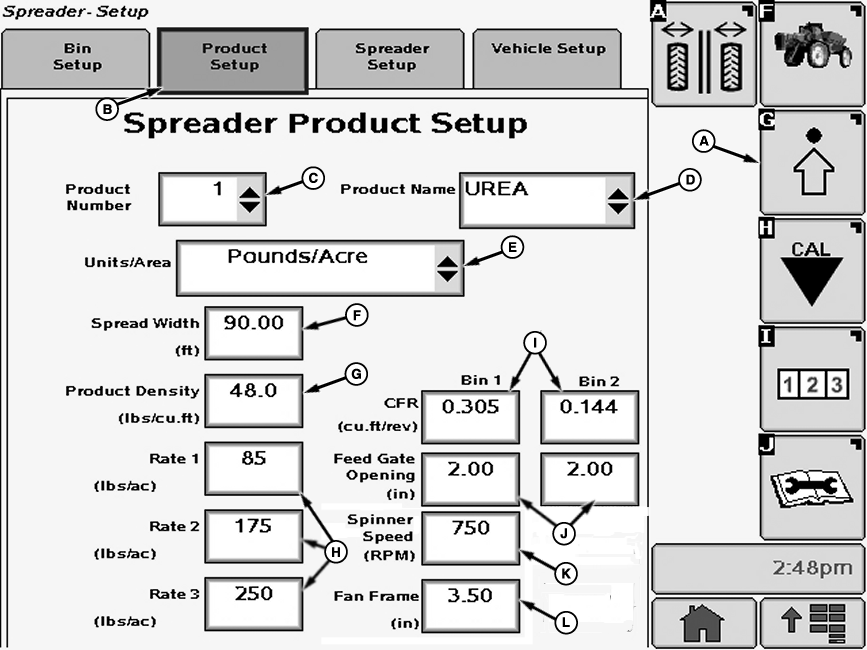
N82568-UN-08DEC08A - Setup Softkey
B - Product Setup Tab
C - Drop-down Box
D - Drop-down Box
E - Drop-down Box
F - Input Box
G - Input Box
H - Input Box
I - Input Box
J - Input Box
K - Input Box
L - Input Box
Select the Setup softkey (A). -
Select the Product Setup tab (B). Spreader Product Setup screen appears.
The following items are displayed on the Product Setup screen:
Product Number (C):—Allows operator to number products that are programmed into SpreadStar.
Product Name (D):—Allows operator to select between products that are programmed into Spreadstar.
Units/Area (E):—Allows operator to select either kg/ha or t/ha (lb./acre or tons/acre) as the unit of measure for the product.
Spread Width (F):—Allows operator to enter spread width in meters (feet).
Product Density (G):—Where density of selected product, in kg/m3 (lb./cu. ft.), is input into Spreadstar.
Application Rates 1, 2, or 3 (H):—Where target application rates, in kg/ha or t/ha (lb./acre or tons/acre), are input into Spreadstar.
CFR (I):—Conveyor Feed Rate. Volume of material in cm3 spread per revolution of the belt drive roller at a 1.0 cm feed gate opening (cu. ft. per revolution at 1.0 in. feed gate opening). CFR can be entered for material in each bin. Input box under Bin 2 will not be present if in single bin setup.
Feed Gate Opening (J):—Where opening in cm (in.) is entered for each bin.
Spinner Speed (K):—Where target spinner speed in rpm is entered.
Fan Frame (L):—Where fan frame setting in cm (in.) is entered.
NOTE: Fan Frame setting is for operator reference only and is not used in any Spreadstar application rate calculations. Refer to New Leader OM for proper fan frame settings based on product type being applied.
|
CS12167,000037E-19-20130513 |