Spreader Check Test
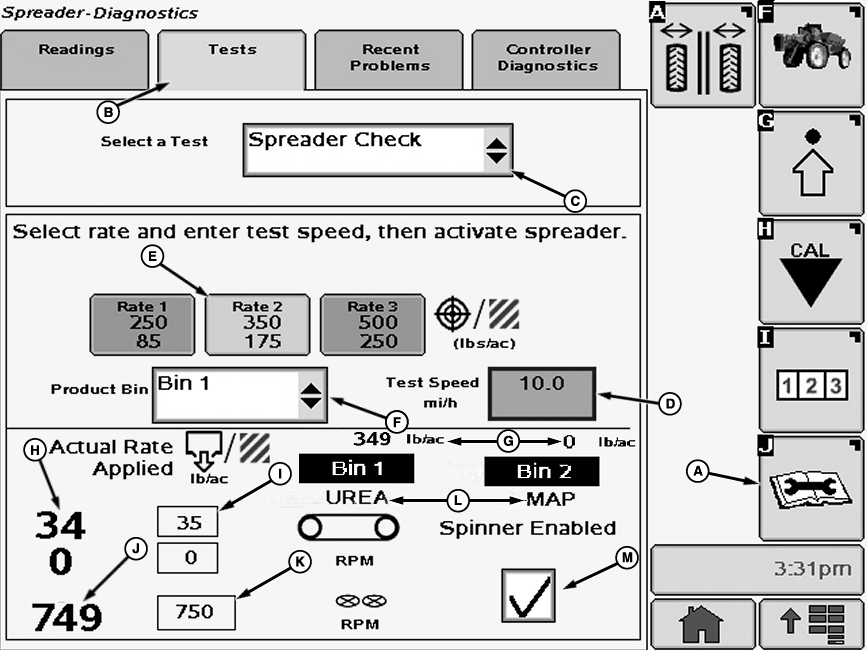
N86773-UN-27OCT09
A - Diagnostics Softkey
B - Tests Tab
C - Drop-Down Box
D - Input Box
E - Pre-programmed Target Rates Per Area
F - Drop-Down Box
G - Actual Rate Applied
H - Actual Belt RPM Bin 1
I - Target Belt RPM Bin 1
J - Actual Spinner RPM
K - Target Spinner RPM
L - Product
M - Check Box
Spreader Check is a procedure to check your application rate at a desired speed while the machine is not moving. The following items can be determined:- If the actual application rate can meet the target application rate at a given speed
- The actual applied rate
- If the actual belt rpm can meet the target belt rpm at a given speed
- If the actual spinner rpm can meet the target spinner rpm at a given speed
Procedure can also be run with box empty to verify conveyor and spinner operate as desired.
-
IMPORTANT: Always fill spreader box with enough product to do a proper spreader check.
Select Diagnostics softkey (A).
-
Select the “Tests” tab (B).
-
Select “Spreader Check” from the tests drop down menu (C).
-
Select input box (D) next to Test Speed. Enter a speed value, such as 16.1 km/h (10 mi/h), using pop-up keyboard. Select the enter button to accept new value.
-
NOTE: The application rate to be tested must be pre-programmed into the Spreadstar system. (See Setting Application Rates in this manual.)
Turn rate select knob to target application rate (manual, 1, 2, or 3). Rate shown in this example is (E) 350 lbs/acre.
-
NOTE: Check is performed separately for each bin if equipped with dual bin spreader.
Select bin to test from the drop down box (F).
-
The spinners can be enabled during this test by selecting check box (M).
-
NOTE: Solution PUMP ENGAGE switch is used as SPINNER ENABLE Switch when dry spreader is installed. MASTER ON switch on multifunction control handle is used for CONVEYOR BELT START switch.
Operate engine at maximum RPM and engage Master ON with spinners disabled.
-
Hold a known volume container under belt and measure output for one minute.
The actual application rate is shown at location (G).
If the actual application rate does not get to the target rate, the gate opening needs to be increased.
If the volume is higher than expected, the gate opening needs to be decreased.
Compare the target belt speed (I) and the actual belt speed (H), which are displayed for the product bin selected, to see if the system is capable of reaching the target belt speed.
Compare the target spinner speed (K) and the actual spinner speed (J) to see if the system is capable of reaching the target spinner speed.
|
CS12167,000037F-19-20130513 |