Setup Number of Boom Sections, Number of Nozzles and Placement
-
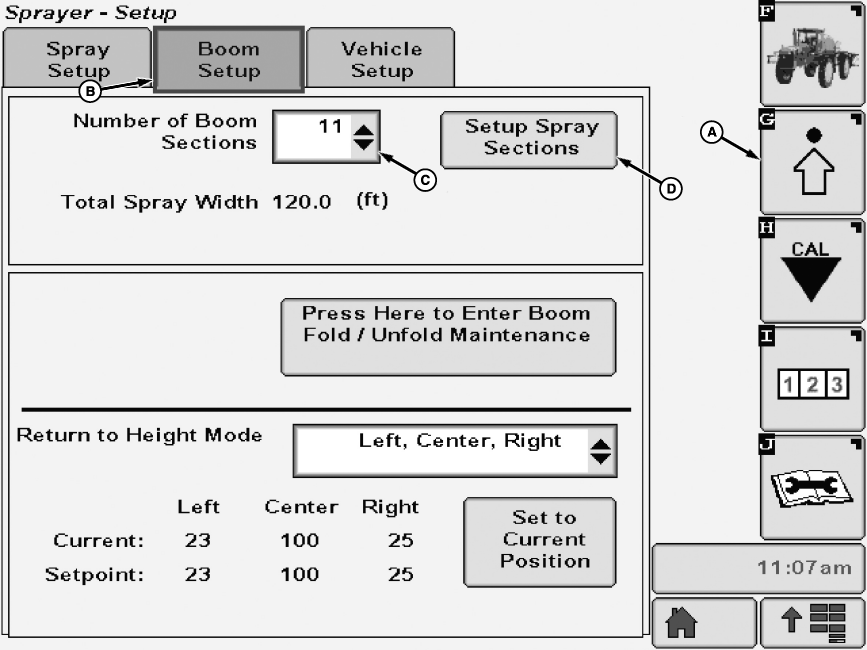
N101914-UN-08APR13A - Setup Softkey
B - Boom Setup Tab
C - Input Box
D - Setup Spray Sections Button
Select the Setup softkey (A) to view the setup menu. -
Select the Boom Setup tab (B).
-
Select each input box (C) next to Number of Boom Sections to be changed and enter a new value using pop-up keyboard. Select the Enter button to accept new value.
-
Press Setup Spray Sections button (D). The Setup Spray Sections screen will appear.
-
N105811-UN-20AUG13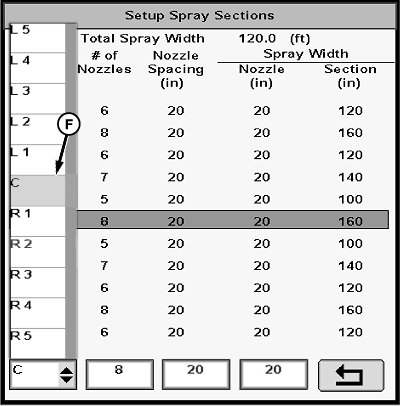
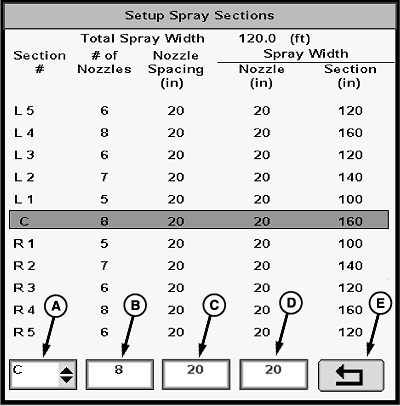
N105812-UN-20AUG13A - Drop-down Box
B - Input Box
C - Input Box
D - Input Box
E - Enter Button
F - Drop-down Box Menu
Select drop-down box (A) below Section # and select section to change from drop-down box menu (F). -
Select each input box (B-D) to be changed and enter a new value using pop-up keyboard. Select the Enter button to accept new value. (Repeat for each section on boom.)
NOTE: In broadcast spraying only, nozzle spray width is equal to nozzle spacing. Refer to back side of nozzle tip calculator to determine effective tip spray width.
NOTE: Section spray width and total width are calculated automatically from above settings.
-
Select the Enter button (E) to accept new values.
|
CS12167,00003D8-19-20130813 |