Setup BoomTrac Pro Sensors
N104108-UN-12JUN13
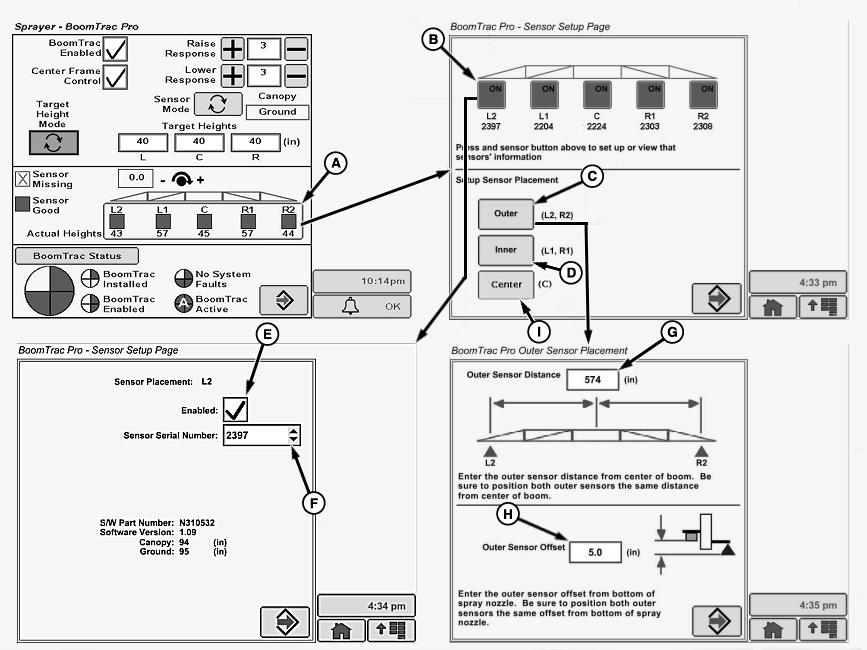
A - Boom Section Softkey
B - Section Softkey
C - Outer Sensor Placement Softkey
D - Inner Sensor Placement Softkey
E - Sensor Enable\Disable Check Box
F - Drop-Down Box
G - Input box
H - Input Box
I - Center Sensor Placement Softkey
-
Select BoomTrac Pro button on Sprayer Main Page.
-
Select Boom Section softkey (A) on BoomTrac Pro Setup Page. BoomTrac Pro Sensor Setup page will appear.
-
NOTE: To setup BoomTrac Pro sensors, document the physical location of each sensors and its corresponding serial number located on the bottom of the sensor. The location for left / right is as when the operator is sitting in the seat with R1 and L1 being sensors located closest to the centerline (of the machine as compared to R2 and L2.
If BoomTrac is field installed or a faulty sensor is replaced, setup of Boom Height Sensors should be done before any other changes or calibrations are performed.
Select individual Section softkey (B) to access a second Sensor setup page where:
- Individual sensor can be enbled\disabled using check box (E)
- Sensor serial number for that location can be selected using drop-down box (F)
- Sensor information can be viewed
-
Select the Outer Sensor Placement softkey (C) to access the Outer Sensor Placement page where the outer sensor distance can be entered in the input box (G) and the outer offset distance can be entered in the input box (H).
NOTE: Outer Sensor Distance (G)— this distance is from the center of the suspended center frame to the center of the outer boom BoomTrac Pro height sensor.
Outer Sensor Offset (H)— The distance from the bottom of the BoomTrac Pro sensor to the bottom of the boom (spray nozzles). This value should only be changed if a different bracket is used or placement of the sensor on the boom is changed. Offset value for standard bracket is 50 mm (2 in.).
-
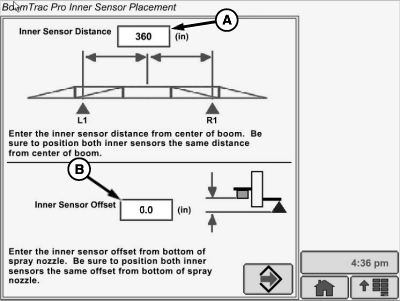
Select the Inner Sensor Placement softkey (D) to access the Inner Sensor Placement page.
-
N87472-UN-09DEC09A - Input Box
B - Input Box
Enter the inner sensor distance in input box (A) and enter the inner offset distance in the input box (B).NOTE: Inner Sensor Distance (A)— The distance entered here is the distance from the center of the suspended center frame to the center of the inner boom BoomTrac Pro height sensor. The default value is the recommended placement for the location of the sensor.
Inner Sensor Offset (B)— This is the distance vertically from the bottom of the boom to the face of the BoomTrac Pro height sensor. Offset value for the standard bracket is 305 mm (12 in.).
-
N89007-UN-07JUL10A - Center Sensor Offset
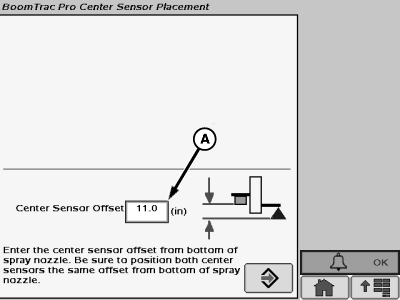
Select Center Sensor Placement softkey (I) to access Center Sensor Placement page. -
Center Sensor Offset (A) is the distance of the BoomTrac Pro height sensor to the bottom of the center frame nozzles. This distance is approximately 50 mm (2 in.). Always measure your machine to verify this distance.
N103023-UN-26MAR13
Inner Section
N103022-UN-26MAR13
Breakaway Section
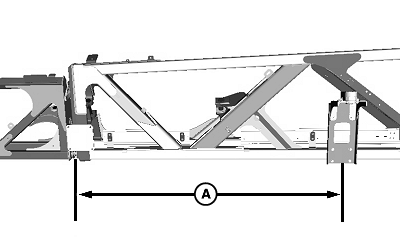
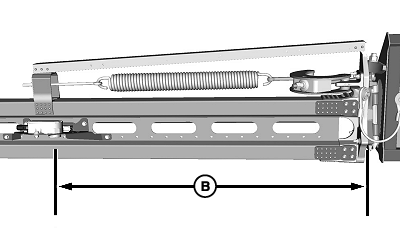
A - Distance from Hinge
B - Distance from Hinge
Measuring distances correctly.
|
Default Locations Of The Sensors On Different Boom Sizes |
||||
|
Inner Boom Section |
Breakaway Section |
|||
|
Boom Length |
Distance from Hinge (A) |
Distance from Center of Center Frame |
Distance from Hinge (B) |
Distance from Center of Center Frame |
|
27.4 m (90 ft.) |
23.4 mm (1 in.) |
9,248 mm (364 in.) |
1,288 mm (51 in.) |
11,835 mm (466 in.) |
|
30.5 m (100 ft.) |
23.4 mm (1 in.) |
9,248 mm (364 in.) |
1,288 mm (51 in.) |
13,359 mm (526 in.) |
|
36.6 m (120 ft.) |
1590 mm (63 in.) |
9,670 mm (381 in.) |
1,288 mm (51 in.) |
16,407 mm (646 in.) |
|
CS12167,0000406-19-20130909 |