Perform Nozzle Check
-
 CAUTION: Read carefully the directions printed on the chemical
manufacturer's labels before handling chemicals or you may be exposed
to hazardous materials which could poison and injure you.
CAUTION: Read carefully the directions printed on the chemical
manufacturer's labels before handling chemicals or you may be exposed
to hazardous materials which could poison and injure you.IMPORTANT: Do not add chemical to solution tank until just before field use. Follow the chemical manufacturer's instructions for mixing the spray solution to obtain the desired application rate and effect.
NOTE: Nozzle check feature will not function unless the boom is unfolded.
Nozzle check is intended for locating plugged or malfunctioning nozzles.
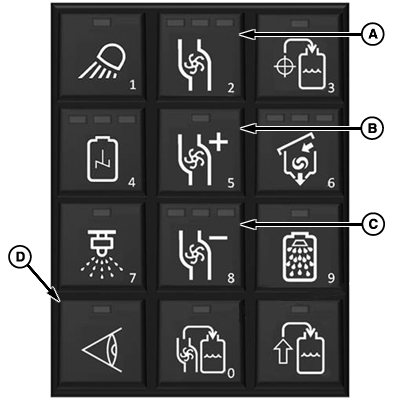
N94527-UN-17SEP12A - Pump On/Off Button
B - Pump Speed Increase Button
C - Pump Speed Decrease Button
D - Nozzle Check Button
Press pump button (A). -
Adjust pump speed if desired using buttons (B) and (C).
-
Press nozzle check button (D) to start the nozzle check routine. Routine starts with left most section and works section by section across the boom.
NOTE: Nozzle check has a delayed start to allow operator to get in position to visually inspect nozzles.
-
Press pump on/off button, nozzle check button to stop nozzle check.
|
CS12167,000041C-19-20130912 |