Configurable Lights
 CAUTION: Accidental collision with another vehicle can cause
serious injury or death to you or others. Always comply with traffic
regulations when driving machine on a road. Dim headlights to low-beam
for oncoming vehicles.
CAUTION: Accidental collision with another vehicle can cause
serious injury or death to you or others. Always comply with traffic
regulations when driving machine on a road. Dim headlights to low-beam
for oncoming vehicles.
N108559-UN-05NOV13
N102016-UN-11FEB13
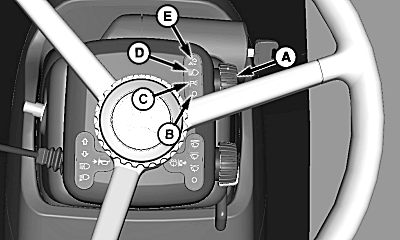
A - Light Switch
B - OFF Position
C - Park Lights Position
D - Road Lights Position
E - Field Lights Position
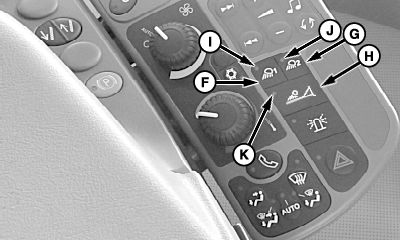
F - Field Light Setting 1
G - Field Light Setting 2
H - Boom Light Switch
I - Field Light Setting 1 Indicator
J - Field Light Setting 2 Indicator
K - Boom Light Indicator
To avoid motorist confusion, do not operate field lights when transporting on public roadways. Use only road lights.
Light switch (A) has 4 positions:
- OFF—Turns Off all exterior lights with exception of hazard lights when hazard switch is on
- Park—Turns red tail lights On
- Road—Turns On high or low beam headlights
- Field—Turns On selected flood lights and red tail lights (See Setup Configurable Lights in Operating the Machine section)
Field lights setting 1 (F) and field lights setting 2 (G) allow the operator to select between 2 preset lighting configurations. Boom lights can be turned On by pressing the boom light switch (H). Press boom light switch again to turn lights Off.
Indicators (I, J, and K) show which light setting is selected.
NOTE: See Light Operation Table in this section.
|
CS12167,00004C3-19-20131105 |