Apply Low Application Rates
N103522-UN-24APR13
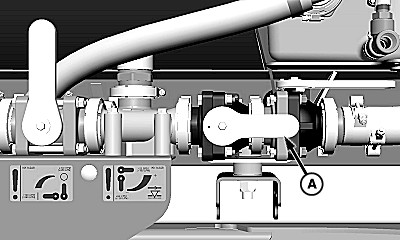
Valve in ON (High Flow) Position
N103136-UN-10APR13
A - Orifice Valve
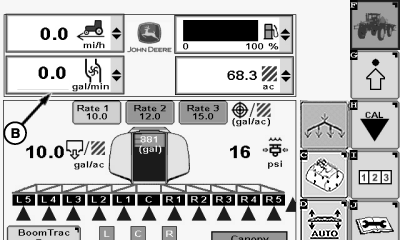
B - Solution Flow
When applying low application rates, it may be necessary to turn orifice valve (A) to the OFF (low) position.To determine when to turn orifice valve OFF, calculate boom flow rate. When solution flow rate is 100 Lpm (26 gpm) or less, turn orifice valve OFF. If solution flow rate is greater that 100 Lpm (26 gpm) turn orifice valve ON all the way.
Determining Solution Flow Rate:
When spraying, go to Sprayer Main Page and check solution flow rate (B) if that feature has been selected on one of the drop down menus available on that page. If solution flow rate is 100 Lpm (26 gpm) or less, turn orifice valve OFF. If solution flow rate is greater than 100 Lpm (26 gpm) turn orifice valve ON all the way.
Determine size of nozzles and multiply by the total number of nozzles on the boom. If solution flow rate is 100 Lpm (26 gpm) or less, turn orifice valve OFF. If solution flow rate is greater that 100 Lpm (26 gpm) turn orifice valve ON all the way.
Example: If ULAC 020 nozzles are installed and there are 96 on the boom: 0.2 gpm x 96 = 19.2 gpm (solution flow rate).
Operator would turn orifice valve OFF. After orifice valve position has been properly set operator must enter valve position in GS3 display in cab. (See Enable High Flow Rate in this section.)
NOTE: Entering orifice valve position in GS3 display does NOT change orifice valve position.
|
CS12167,00004E0-19-20131119 |