Operate Automatic Temperature Control — ClimaTrak (ATC)
N102013-UN-11FEB13
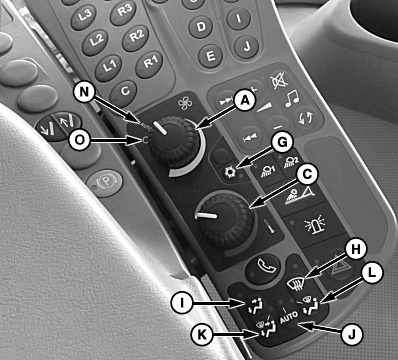
CommandARM Controls
N102631-UN-01MAR13
A - Fan Speed Control Dial
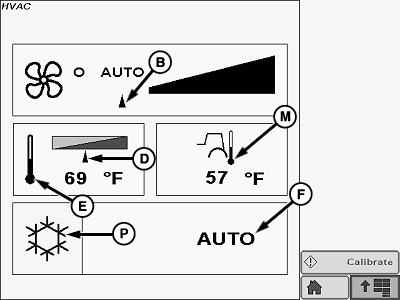
B - Fan Speed Indicator Arrow
C - Temperature Control Dial
D - Temperature Indicator Arrow
E - Set Point Temperature Display
F - HVAC Mode
G - Air Conditioner Control Switch
H - Defrost Switch
I - Cab And Floor Switch
J - Auto HVAC Switch
K - Defrost, Floor and Cab Switch
L - Defrost And Floor Switch
M - Ambient Temperature
N - Auto
O - OFF
P - Air Conditioner Icon
Controls and settings are displayed on the GS3 display. Changes made through CommandARM controls result in GS3 displaying the HVAC page.Rotate fan speed control dial (A) to adjust fan speed. Fan speed indicator arrow (B) moves in relation to fan speed.
Turn temperature control dial (C) to red zone for heating or blue zone for cooling. Temperature display (E) indicates current cab temperature. Ambient temperature (M) is displayed on the GS3 display.
The bottom portion of display (F) indicates which of several modes the heating and cooling unit is currently operating in. Pressing buttons (G through L) changes the display and operating mode. Selecting defrost or air flow options will automatically enable air conditioner. The following describes these modes in detail:
- Air Conditioner Control Switch (G)—turns air conditioner on and off.
- Defrost Switch (H)—turns on defroster and directs air flow to windshield.
- Cab and Floor Swich (I)—directs air flow at operator chest and feet simultaneously.
- Auto HVAC Switch (J)—automatically adjusts temperature and fan speed to maintain desired temperature in operator station.
- Defrost, Floor and Cab Switch (K)—directs air flow to operator and windshield simultaneously.
- Defrost and Floor Switch (L)—directs air flow to footwell and windshield simultaneously.
|
CS12167,00004EA-19-20131203 |