Setup System Rinse
-
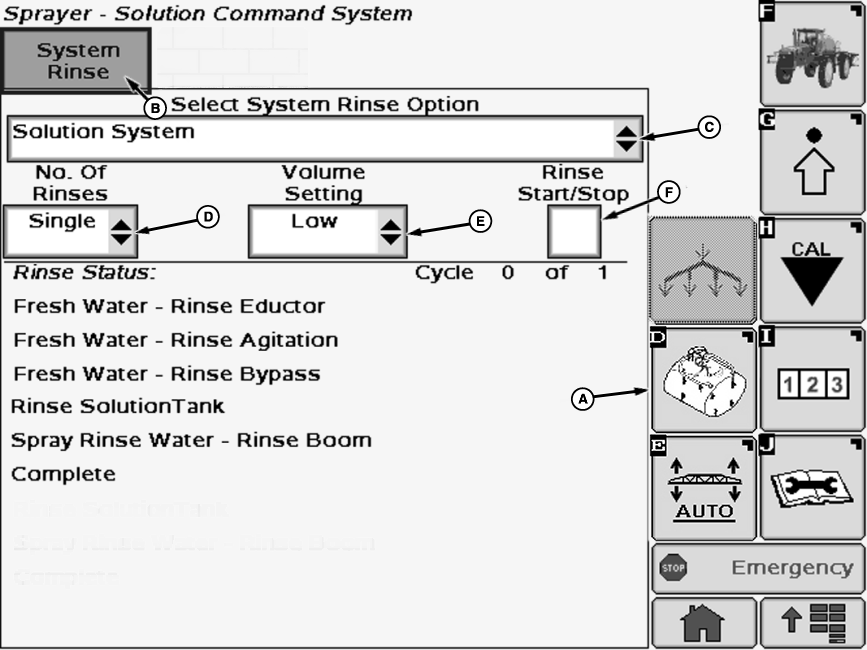
N103526-UN-24APR13A - Solution Command Softkey
B - System Rinse Tab
C - Drop-Down Box
D - Drop-Down Box
E - Drop-Down Box
F - Check Box
Select Solution Command soft key (A). -
Select System Rinse tab (B).
-
Select drop-down box (C) below “Select System Rinse Option” and choose between:
- Boom Only
- Solution System
-
NOTE: The triple rinse selection is NOT applicable to machines equipped with load command.
Select drop-down box (D) below “No. Of Rinses” and choose between:
- Single
- Double
- Triple
-
Select drop-down box (E) below “Volume Setting” and choose between:
- Low
- Medium
- High
-
Select check box (F) below to “Rinse Start/Stop” and a check will appear inside box activating the rinse chosen.
NOTE: Chosen procedure will start automatically. Rinse status is shown by box around active step. At completion of rinse cycle an alert screen will warn to spray rinse water.
-
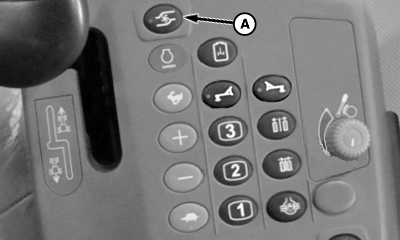
N98755-UN-26SEP12A - Solution Pump Switch
Press top of solution pump switch (A) to engage solution pump. -
Verify boom section(s) to be used enabled by section switches.
-
Press Master Spray ON/OFF to start spraying rinse water.
-
NOTE: When finishing spraying off rinse solution and solution pump runs dry, a warning to shut off pump will appear. When pump is shut off and warning is acknowledged, the system automatically disables spraying and begins next cycle if program with double as the number of rinses was chosen. If single number of rinses is chosen, warning screen will display that solution pump is running dry and to shut off pump.
Shut off solution pump switch when last rinse cycle finished.
|
CS12167,00004F5-19-20131204 |