Mix Solution in Tank (Using Agitation)
-
NOTE: With solution tank filled and solution pump primed, complete the following steps to thoroughly mix chemicals.
Open solution tank lid to visually verify sufficient mixing.
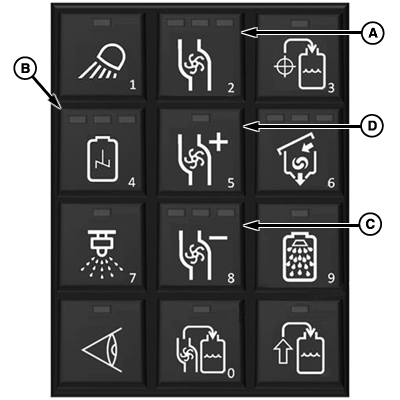
N94526-UN-17SEP12A - Solution Pump Button
B - Agitation Button
C - Pump Speed Decrease Button
D - Pump Speed Increase Button
Push solution pump button (A) to engage solution pump. -
Press agitation button (B) to begin agitation.
-
NOTE: Amount of agitation is determined by pump speed and agitation valve setting.
Agitation valve setting must be set using the GS3 display.
Adjust pump speed using pump speed decrease button (C) or pump speed increase button (D).
-
Mix solution thoroughly before operating in the field.
NOTE: To minimize foaming operate agitation at a lower rate. Turn off agitation when tank volume drops below 378.5 L (100 gal) to prevent foaming and air in system.
-
To stop agitation; press solution pump button to stop pump, press agitation button to close agitation valve.
|
CS12167,0000512-19-20140113 |