Perform Nozzle Check
-
 CAUTION: Read carefully the directions printed on the chemical
manufacturer's labels before handling chemicals, exposure to hazardous
materials could cause injury or death.
CAUTION: Read carefully the directions printed on the chemical
manufacturer's labels before handling chemicals, exposure to hazardous
materials could cause injury or death.Perform nozzle check in an area where people, animals, vegetation and water supply etc. cannot be contaminated.
IMPORTANT: Do not add chemical to solution tank until just before field use. Follow the chemical manufacturer's instructions for mixing the spray solution to obtain the desired application rate and effect.
NOTE: Nozzle check feature will not function unless the boom is unfolded.
Nozzle check is intended for locating plugged or malfunctioning nozzles.
N106855-UN-24SEP13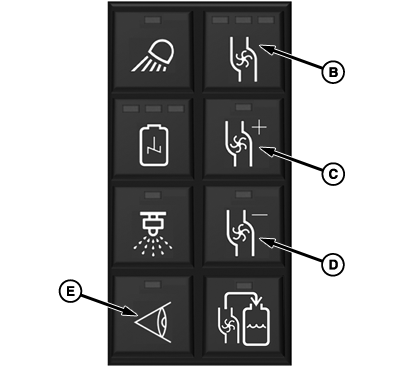
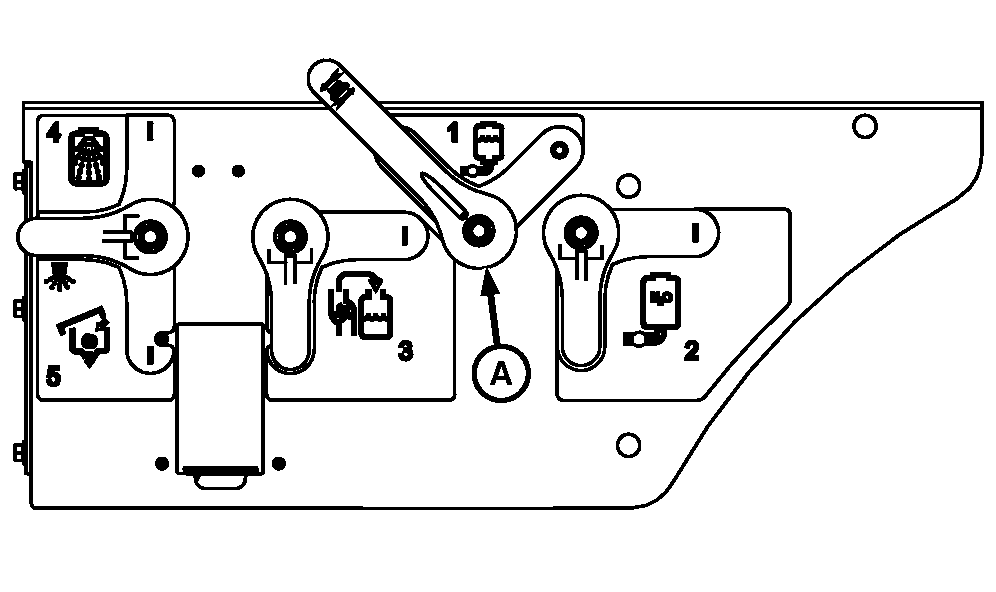
N94715-UN-21SEP11A - Solution Tank Sump Valve
B - Pump On/Off Button
C - Pump Speed Increase Button
D - Pump Speed Decrease Button
E - Nozzle Check Button
Open solution tank sump valve (A). -
Press pump on/off button (B).
-
Adjust pump speed, as necessary, using pump speed increase button (C) and pump speed decrease button (D).
-
Press nozzle check button (E) to start the nozzle check routine. Routine starts with left most section and works section by section across the boom.
NOTE: Nozzle check has a delayed start to allow operator to get in position to visually inspect nozzles.
-
Press pump on/off button or nozzle check button to stop nozzle check.
|
CS12167,000055A-19-20140203 |