External Sources—Using Premium Radio
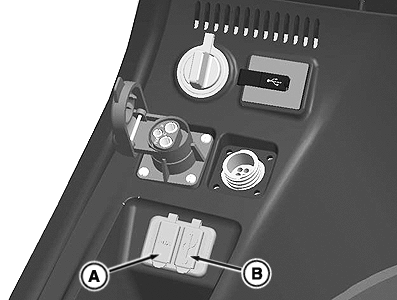
RXA0125619-UN-11MAY12
Auxiliary and USB Input
A - Auxiliary Input
B - USB Input
External audio sources can be connected using convenience port located on right-hand console/storage tray. Sources can also be connected using Bluetooth® functions. Use ports to charge certain external audio sources. Examples of external audio sources include portable CD player, MiniDisc player, or MP3 player.
NOTE: Some external audio sources, such as smart phones and tablets, are not supported and could shut down system
Activate AUX Input
NOTE: External audio source can only be selected if audio device is connected to external AUX input.
Connect external audio source using Auxiliary Input (A) and press SRC button several times until AUX is displayed on radio.
Activate USB Input
NOTE: USB audio source can only be selected if USB device is connected to external USB input.
Connect USB audio source using USB Input (B) and press SRC button several times until USB is displayed on radio.
Adjust AUX Input Volume
Volume for connected external audio source can be adjusted using radio volume knob after input is selected as audio source using SRC button.
- Press SRC button several times until installed audio source is displayed.
- Press MENU button. GAIN and current setting is displayed.
- Turn volume control knob counterclockwise or clockwise to adjust value from -9 to +9.
- Press the MENU button several times to exit the menu.
|
CS12167,000055D-19-20140306 |